Transitioning a Patient to a New Program

To transition a patient to a new program, you will need to end their current episode of care and begin a new episode of care. If the patient will also have new providers or a new primary provider, this information will need to be updated as well.

Ending an episode of care​

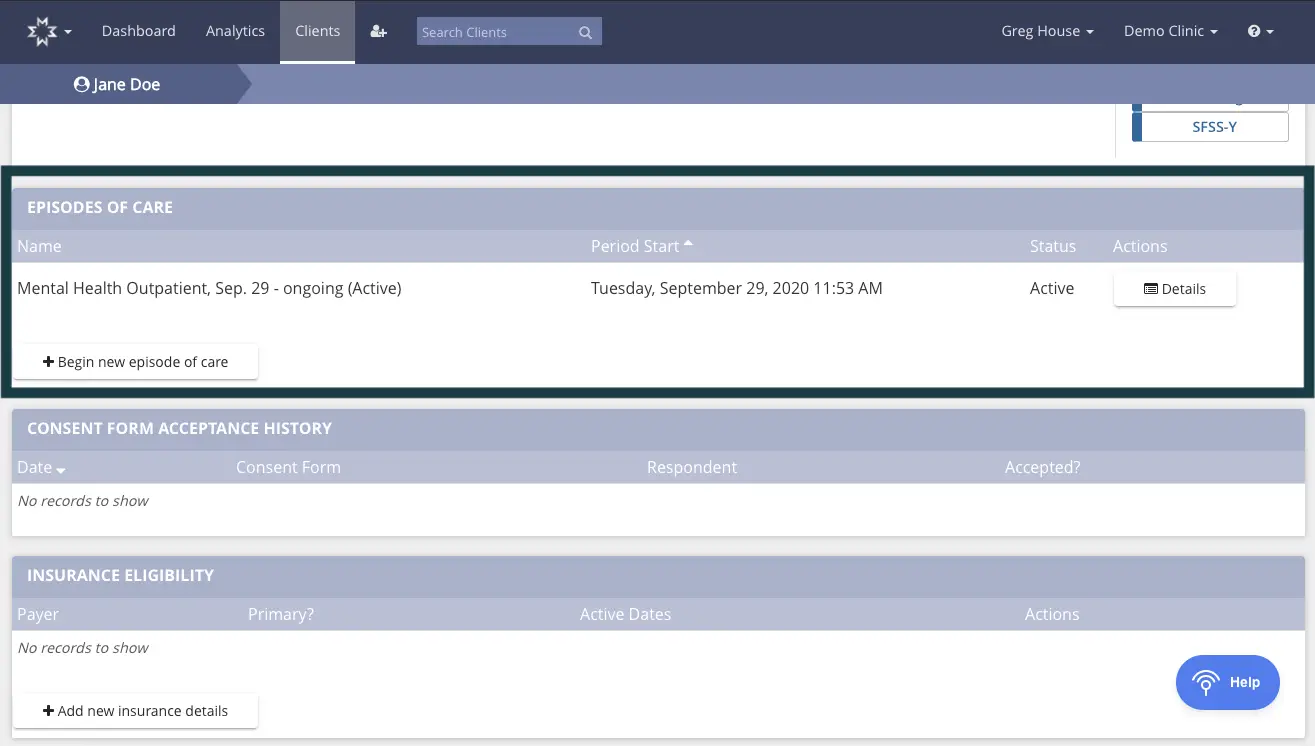
To end an episode of care for a patient, navigate to their Detail page and scroll down to "Episodes of Care"
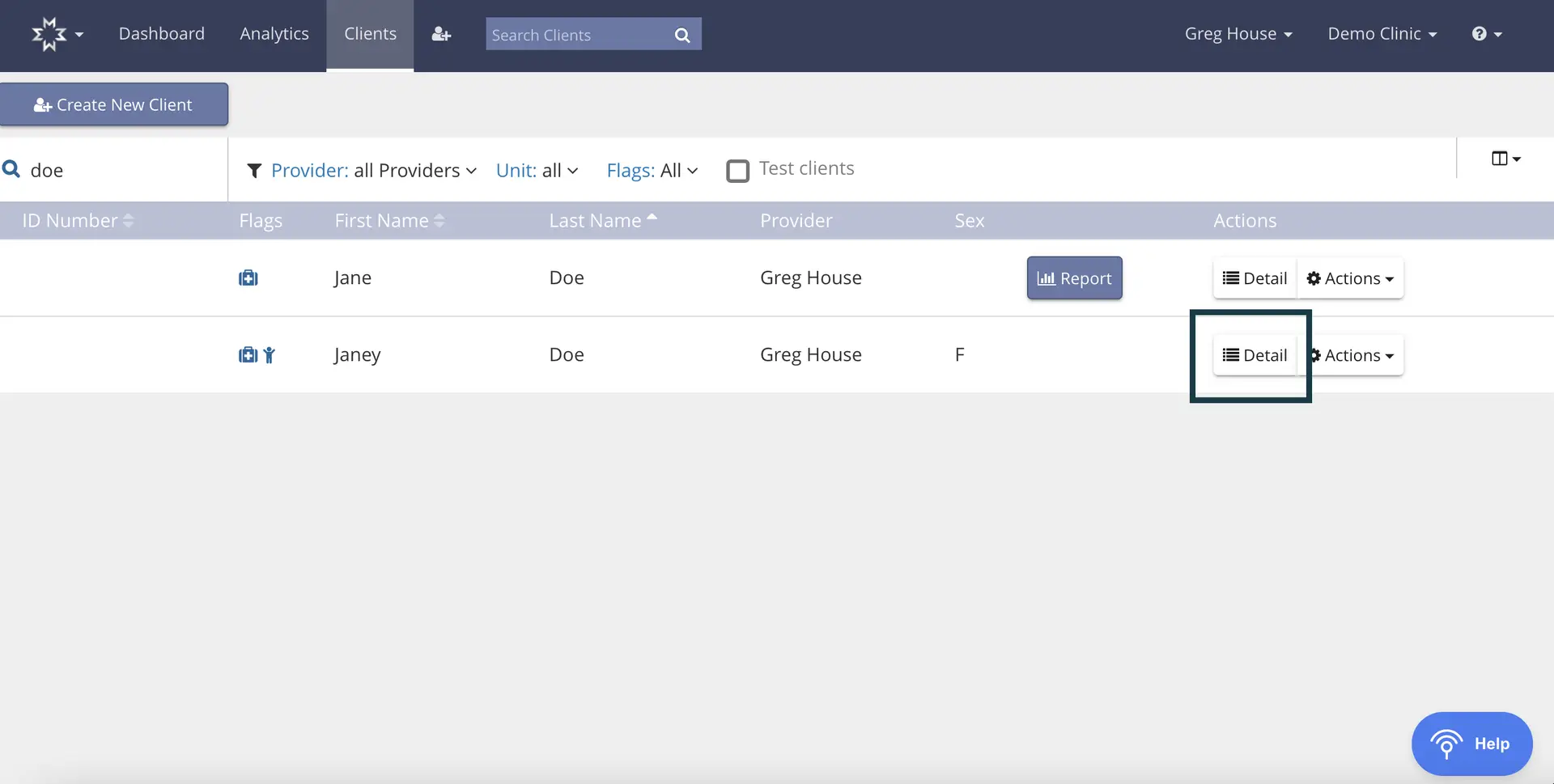
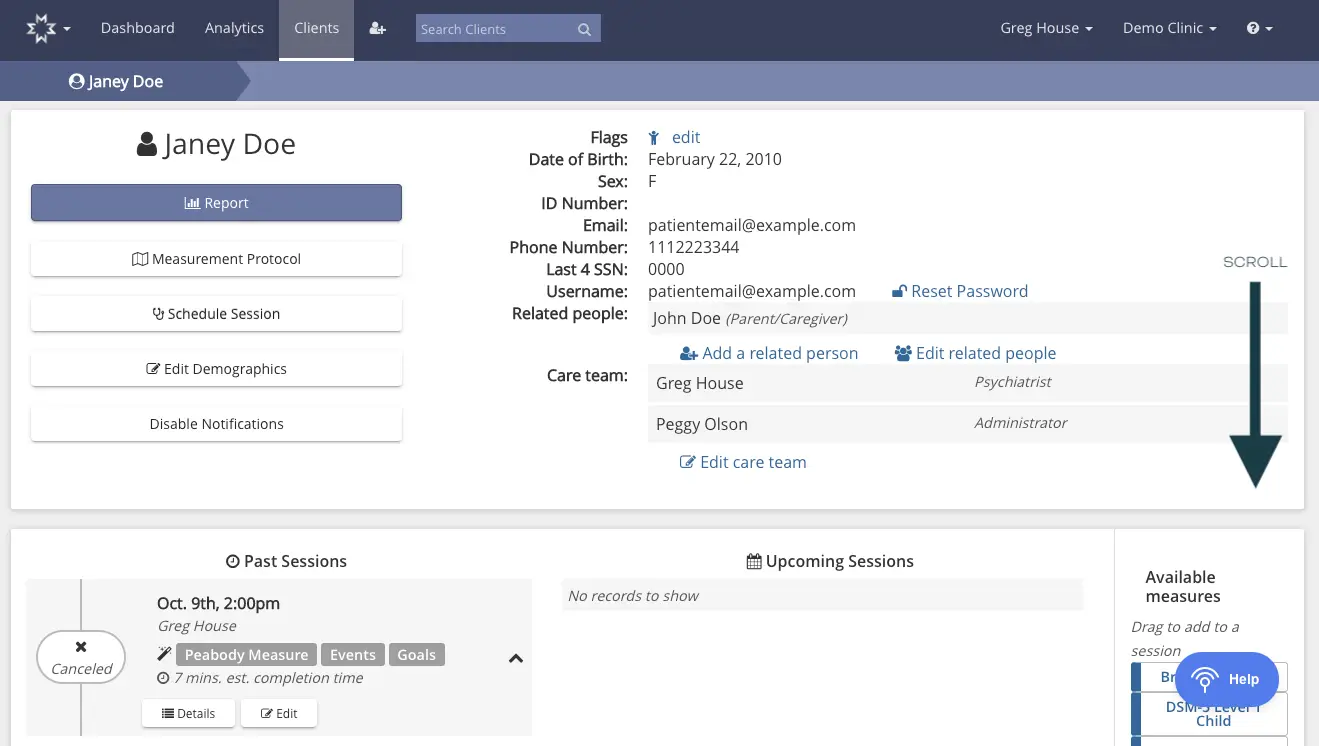
The screenshot displays the 'Clients' section of the Mirah Measurement-Based Care platform, where users can manage client information. At the top, there is a navigation bar with options for Dashboard, Analytics, and Clients, along with a search bar labeled 'Search Clients' for finding specific clients. The user is logged in as Greg House at Demo Clinic. Below the navigation bar, there is a button labeled 'Create New Client' for adding new clients. The main area shows a list of clients filtered by the search term 'doe', with columns for ID Number, Flags, First Name, Last Name, Provider, and Sex. Each client row has a 'Detail' button and an 'Actions' dropdown menu on the right side for accessing more information or performing actions related to the client. The 'Report' button is located next to the client list for generating reports. The 'Help' button is at the bottom right corner for accessing assistance.The screenshot displays the patient profile page for Janey Doe within the Mirah Measurement-Based Care platform. At the top, the navigation bar includes options for Dashboard, Analytics, Clients, and a search bar for searching clients. The user is logged in as Greg House at Demo Clinic. The main section shows Janey Doe's profile with buttons for generating a report, accessing the measurement protocol, scheduling a session, editing demographics, and disabling notifications. These buttons are located on the left side of the profile. On the right, Janey Doe's personal information is listed, including flags, date of birth, sex, ID number, email, phone number, last 4 SSN digits, and username. There are links to reset the password, add a related person, and edit related people. The care team is listed with Greg House as the psychiatrist and Peggy Olson as the administrator, with an option to edit the care team. Below, past sessions are displayed with details of a canceled session on October 9th at 2:00 pm with Greg House, including Peabody Measure, Events, and Goals, with an estimated completion time of 7 minutes. There are buttons for details and editing the session. Upcoming sessions are shown with no records available. On the right, there is a section for available measures that can be dragged to add to a session, with a help button located at the bottom right.The screenshot displays the 'Episodes of Care' section for a patient named Jane Doe within the Mirah Measurement-Based Care platform. The top navigation bar includes options for Dashboard, Analytics, and Clients, with a search bar for finding clients. The user is logged in as Greg House at Demo Clinic. The 'Episodes of Care' section lists a current episode named 'Mental Health Outpatient, Sep. 29 - ongoing (Active)' with a start date of Tuesday, September 29, 2020, at 11:53 AM. The status is marked as Active, and there is a 'Details' button located to the right for more information. Below this section, there are areas for 'Consent Form Acceptance History' and 'Insurance Eligibility,' both of which currently show 'No records to show.' The 'Consent Form Acceptance History' section includes columns for Date, Consent Form, and Respondent, while the 'Insurance Eligibility' section includes columns for Payer, Primary?, and Active Dates. There is a button labeled '+ Begin new episode of care' located under the 'Episodes of Care' section and a button labeled '+ Add new insurance details' under the 'Insurance Eligibility' section. A 'Help' button is located at the bottom right corner of the screen.

To end the current episode of care, click "Detail" within the "Episodes of Care" box. After you are directed to the Details page for the episode of care, click "Discharge," and confirm the action when prompted. This will end the patient's current episode of care.
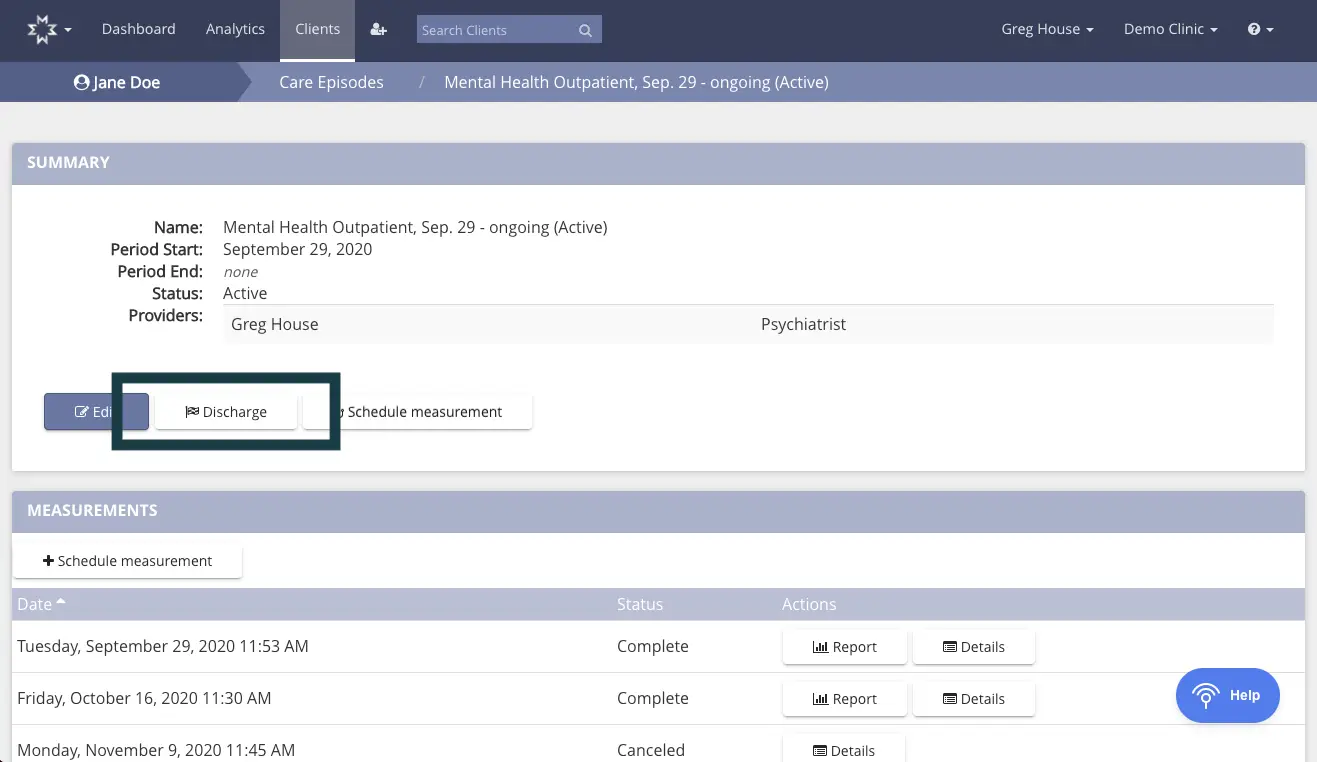
The screenshot displays the interface for managing a patient's care episode within the Mirah Measurement-Based Care platform. At the top, the navigation bar includes options for Dashboard, Analytics, Clients, and a search bar for finding clients. The user's name, Jane Doe, is shown on the left, and the current clinic, Demo Clinic, is on the right. The breadcrumb trail indicates the user is viewing the 'Mental Health Outpatient, Sep. 29 - ongoing (Active)' care episode. The Summary section provides details about the care episode, including the name, period start date, period end date, status, and provider, Greg House, who is a psychiatrist. Below the summary, there are three buttons: 'Edit' on the left, 'Discharge' in the center, and 'Schedule measurement' on the right, allowing the user to modify the episode, discharge the patient, or schedule a new measurement. The Measurements section lists past measurement dates, their status, and actions available for each, such as viewing a report or details. The 'Help' button is located at the bottom right corner of the screen.

Starting a new episode of care​

To begin a new episode of care, click "+ Begin new episode of care" in the same "Episodes of Care" box on the patient's Detail page.
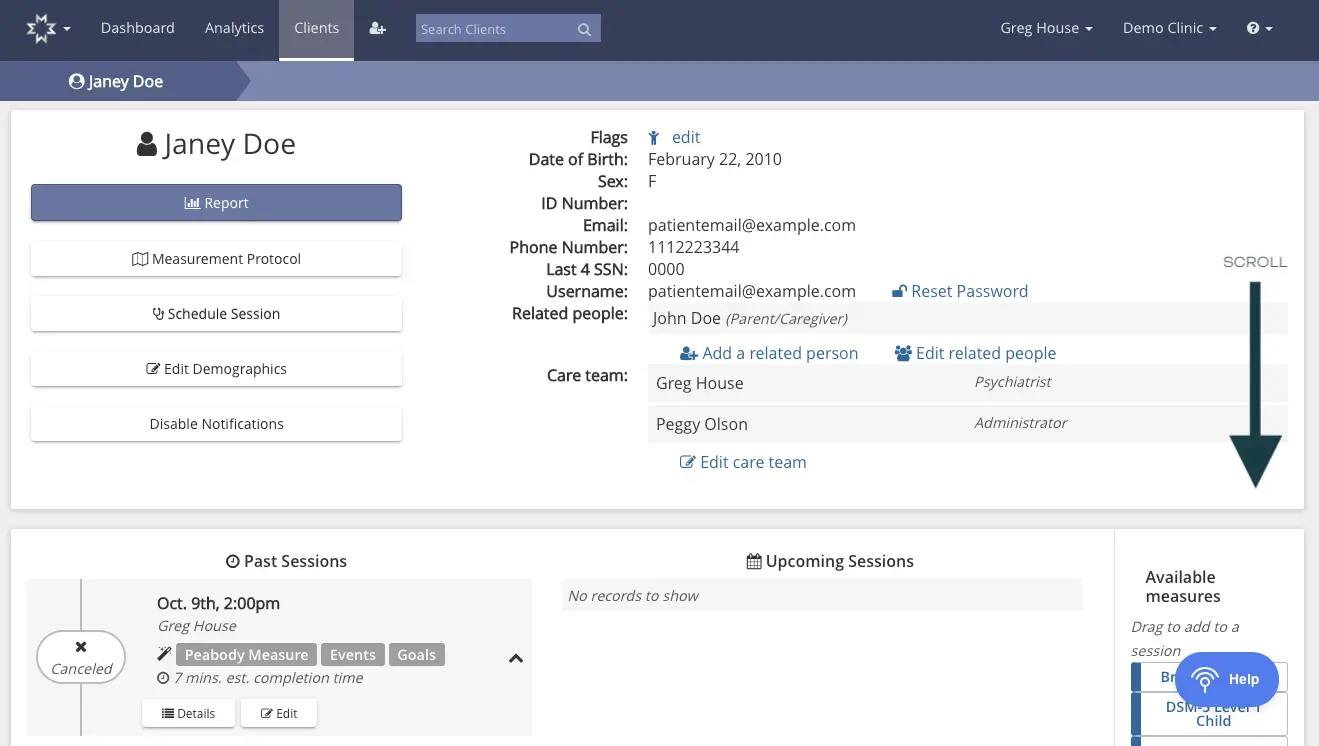
The screenshot displays the patient profile page for Janey Doe within the Mirah Measurement-Based Care platform. At the top, the navigation bar includes options for Dashboard, Analytics, Clients, and a search bar for finding clients. The user is logged in as Greg House at Demo Clinic. The main section shows Janey Doe's profile with buttons for generating a report, accessing the measurement protocol, scheduling a session, editing demographics, and disabling notifications. These buttons are located on the left side of the profile. On the right, Janey Doe's personal information is listed, including flags, date of birth, sex, ID number, email, phone number, last four digits of SSN, and username. There are links to reset the password, add related people, and edit related people. The care team section lists Greg House as the psychiatrist and Peggy Olson as the administrator, with an option to edit the care team. Below, past sessions are displayed with details such as date, time, and associated measures, events, and goals, along with options to view details or edit. Upcoming sessions are shown with a note that no records are available. On the right, there is a section for available measures that can be dragged into a session, with a help button located at the bottom right.

When prompted, select the appropriate unit, care team, and start date for the new program or "episode of care," and save. You can add multiple care team members by choosing a provider from the drop down menu in the "Care Team" box and clicking the "+" button.
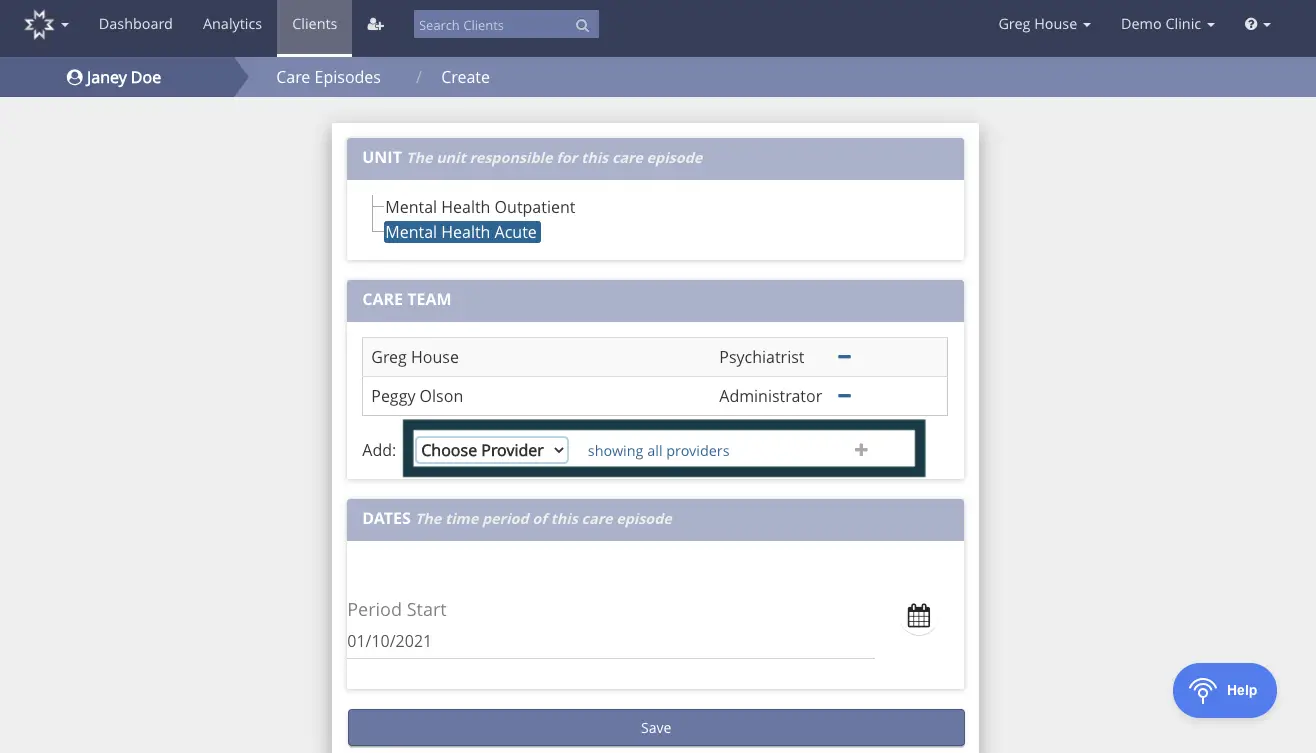
This screen is part of the process for transitioning a patient to a new program within the Mirah Measurement-Based Care platform. The top navigation bar includes links to Dashboard, Analytics, Clients, and a search bar for finding clients. The user is identified as Janey Doe, and the breadcrumb trail indicates the user is in the 'Care Episodes / Create' section. The main content is divided into sections: 'UNIT' displays the unit responsible for the care episode, with options for 'Mental Health Outpatient' and 'Mental Health Acute'. 'CARE TEAM' lists current team members Greg House, a Psychiatrist, and Peggy Olson, an Administrator, with a minus sign next to each for removal. Below, there is a dropdown menu labeled 'Add' for choosing additional providers, with a plus sign to add them. 'DATES' section shows the 'Period Start' date as 01/10/2021, with a calendar icon for date selection. At the bottom, a 'Save' button is present to save changes. The 'Help' button is located in the bottom right corner.

After saving the new episode of care, you will see it appear on the patient's Detail page, alongside any previous episodes of care (or other ongoing episodes of care, if the patient is in concurrent programs).
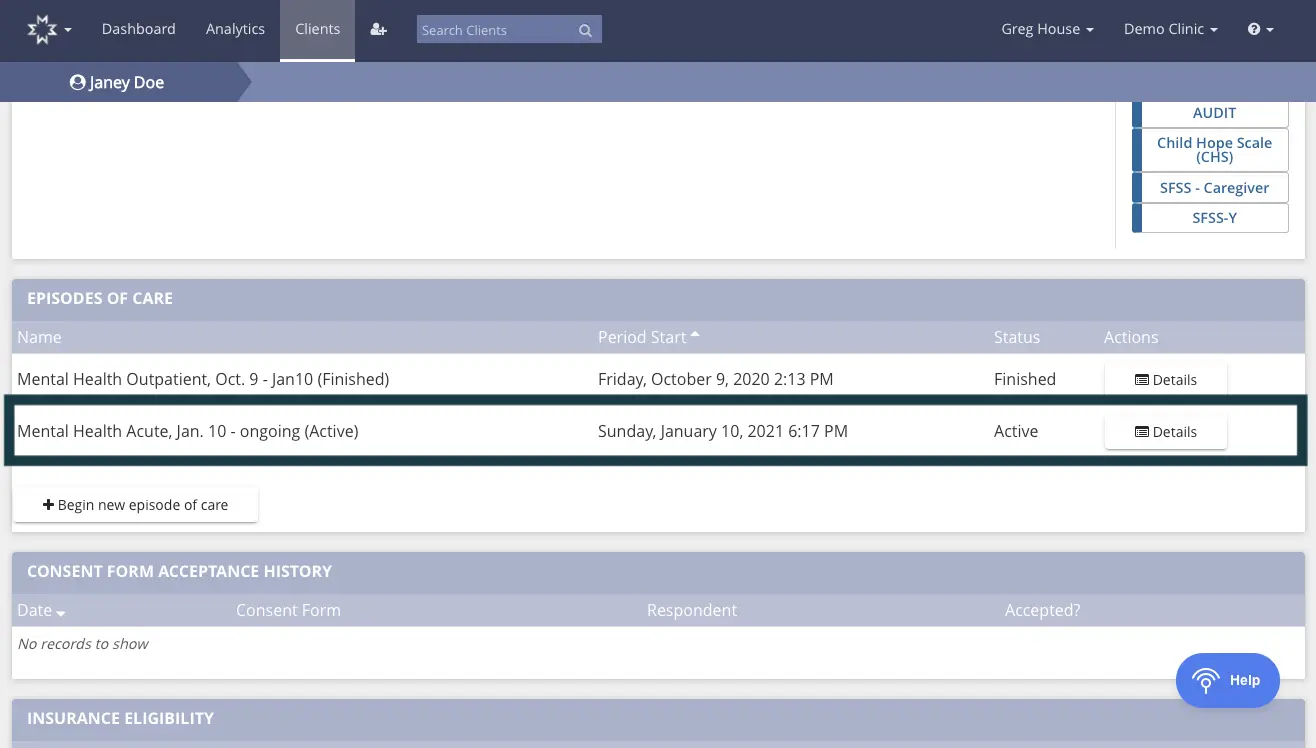
The screenshot displays the 'Episodes of Care' section for a patient named Janey Doe within the Mirah Measurement-Based Care platform. It shows two episodes of care: 'Mental Health Outpatient, Oct. 9 - Jan10 (Finished)' and 'Mental Health Acute, Jan. 10 - ongoing (Active)'. Each episode lists the period start date and time, status, and an 'Actions' column with a 'Details' button for further information. The 'Begin new episode of care' button is located below the episodes list, allowing users to initiate a new care episode. The top navigation bar includes options for Dashboard, Analytics, and Clients, with a search bar for finding clients. The user's name, Greg House, and clinic, Demo Clinic, are displayed in the top right corner. The right sidebar contains assessment tools like AUDIT and Child Hope Scale (CHS). Below the episodes section, there are sections for 'Consent Form Acceptance History' and 'Insurance Eligibility', both currently showing no records.

Changing a patient's care team and/or primary provider​

While creating a new episode of care, you are given the opportunity to add all members of the care team associated with the patient's new program. If you need to update this care team, click "Edit care team" on the patient's Detail page. Note that creating a new episode of care does not update the primary provider information for the patient. If you would like to change this information, please change the primary provider name using the "Edit Demographics" button on the patient's Detail page.