
Feature Guide: Enabling and Interpreting Measurement-Based Care

During the initial rollout period, clients can be enabled individually to receive automatic measurement for a specific episode of care.

1). Navigate from the “Patient Details” screen to the "Episode of Care" section. Click on the Active Episode you wish to enable.
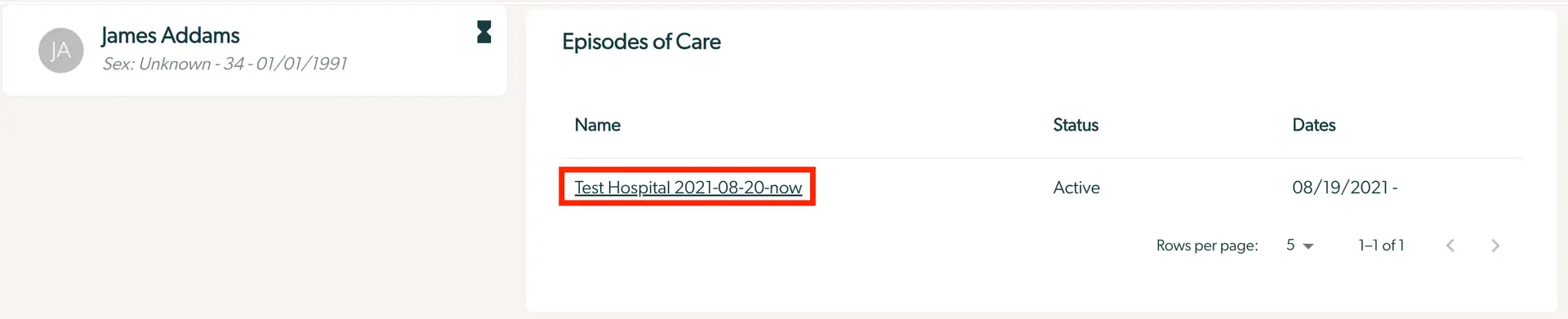
The screenshot displays a section of the Mirah Measurement-Based Care interface, specifically focusing on a patient's Episodes of Care. On the left, there is a profile card for James Addams, showing initials 'JA', with details including sex as unknown, age 34, and birthdate 01/01/1991. To the right, the Episodes of Care section lists episodes with columns for Name, Status, and Dates. The episode 'Test Hospital 2021-08-20-now' is highlighted, indicating it is active with a start date of 08/19/2021. Below the list, there is a pagination control showing 'Rows per page' set to 5, and navigation arrows for moving through pages, currently displaying 1 of 1.

2.) If the banner at the left panel is red and says "Not Participating in Measurement Based Care", then it is OFF and needs to be turned ON.
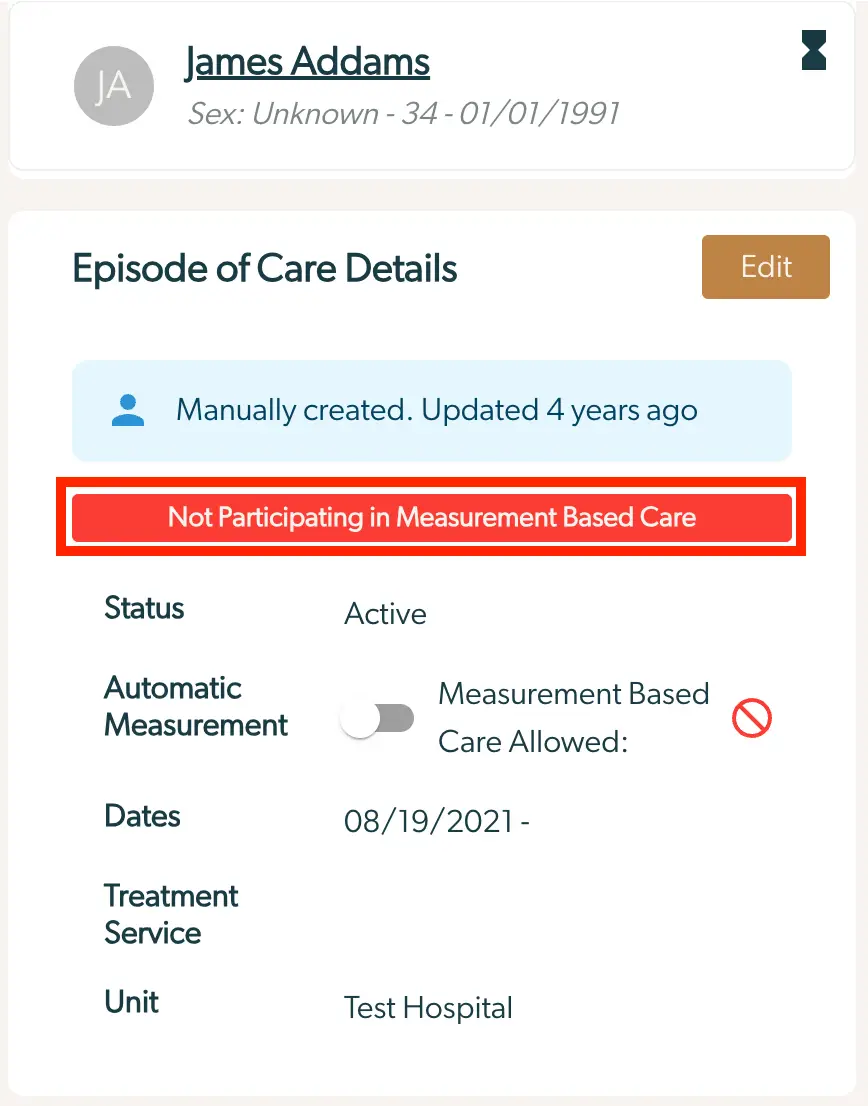
The screenshot displays the 'Episode of Care Details' for a patient named James Addams, whose sex is unknown and is 34 years old with a birthdate of 01/01/1991. The section indicates that the episode was manually created and last updated four years ago. A prominent red banner states 'Not Participating in Measurement Based Care.' The status of the episode is marked as 'Active.' There is a toggle switch for 'Automatic Measurement,' which is currently off, and a label indicating 'Measurement Based Care Allowed' with a prohibition symbol. The dates field shows the start date as 08/19/2021, and the treatment service is associated with 'Test Hospital.' An 'Edit' button is located at the top right corner of the 'Episode of Care Details' section, allowing users to modify the information.

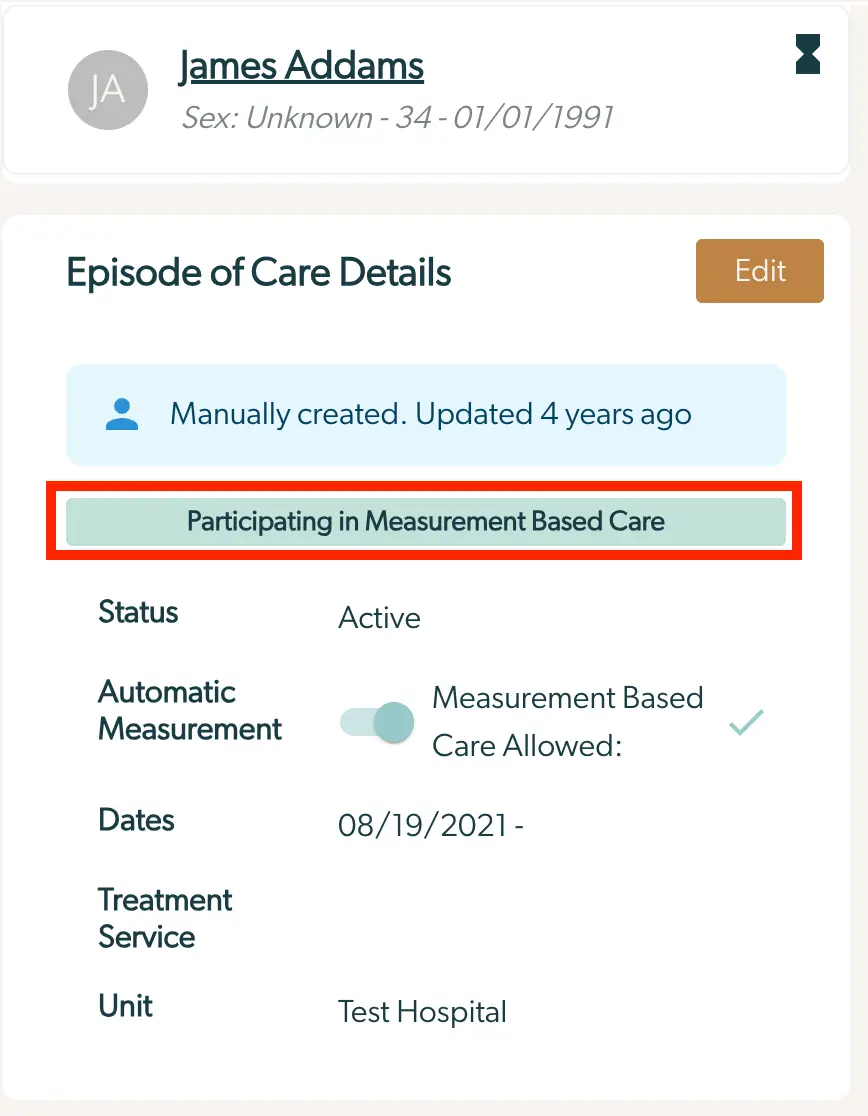
  • If the banner is green and says "Participating in Measurement Based Care", then it is already ON. The screenshot displays the 'Episode of Care Details' section for a patient named James Addams, whose sex is unknown and birthdate is 01/01/1991. The section indicates that the episode was manually created and last updated four years ago. A highlighted banner shows that the patient is participating in Measurement-Based Care. The status of the care is marked as 'Active'. There is a toggle switch for 'Automatic Measurement' which is set to allow Measurement-Based Care, indicated by a checkmark. The care dates start from 08/19/2021, and the treatment service is provided by 'Test Hospital'. An 'Edit' button is located at the top right corner of the section, allowing modifications to the details.
3). On the Care Episode Details screen, select the "Measurement Based Care Allowed" toggle, so it becomes checked.
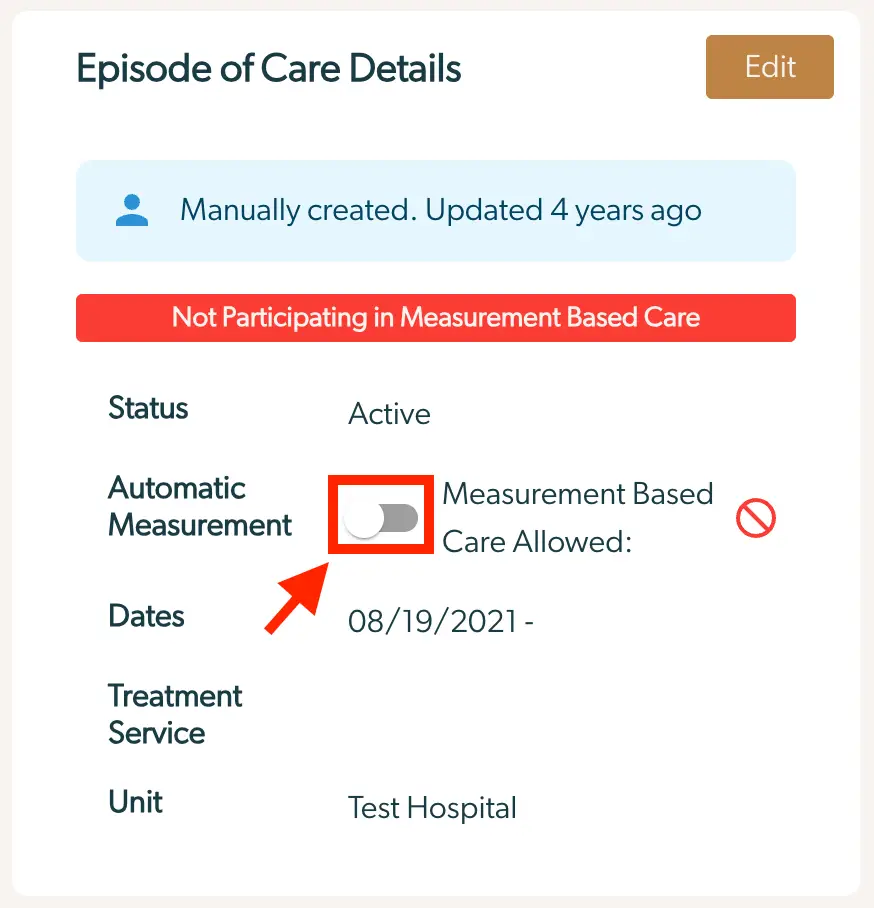
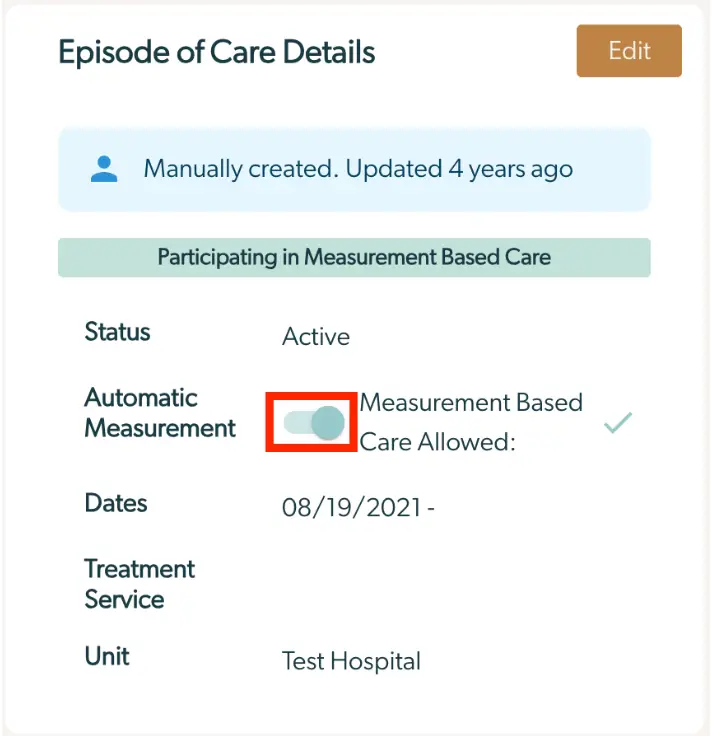
The 'Episode of Care Details' screen provides information about a specific care episode. At the top, there is a blue banner indicating that the episode was manually created and last updated four years ago. Below this, a red banner states 'Not Participating in Measurement Based Care.' The screen includes several fields: 'Status' which is marked as 'Active,' 'Automatic Measurement' with a toggle switch currently set to off, and a label 'Measurement Based Care Allowed' with a prohibition symbol indicating it is not allowed. The 'Dates' field shows the start date as 08/19/2021, and the 'Treatment Service' field is followed by 'Unit' which is listed as 'Test Hospital.' In the top right corner, there is an 'Edit' button for modifying the details.The 'Episode of Care Details' screen provides information about a specific care episode. At the top, there is an 'Edit' button located in the upper right corner, allowing users to modify the details. Below, a blue banner indicates that the episode was manually created and last updated four years ago. A green banner shows participation in Measurement-Based Care. The 'Status' field displays 'Active,' indicating the current state of the care episode. The 'Automatic Measurement' section includes a toggle switch, which is currently set to allow Measurement-Based Care, as indicated by the checkmark next to it. The 'Dates' field shows the start date of the episode as 08/19/2021, with no end date specified. The 'Treatment Service' field is empty, while the 'Unit' field specifies 'Test Hospital,' indicating the location or unit responsible for the care episode.

Interpreting the "Participating in MBC" Badge​

1.) This badge and associated hover tooltip specifies the current status of the episode of care and explanatory details. “Participating in Measurement Based Care” indicates that a given episode of care will receive automatic measures per a measurement plan. “Not Participating in Measurement Based Care” indicates that the patient will not receive automatic measures for that episode of care. The badge tooltip illustrates why an episode of care is either under automatic measurement or not, based on how the institute, organization, and providers are set up in the system. Hover over the badge to reveal these details.
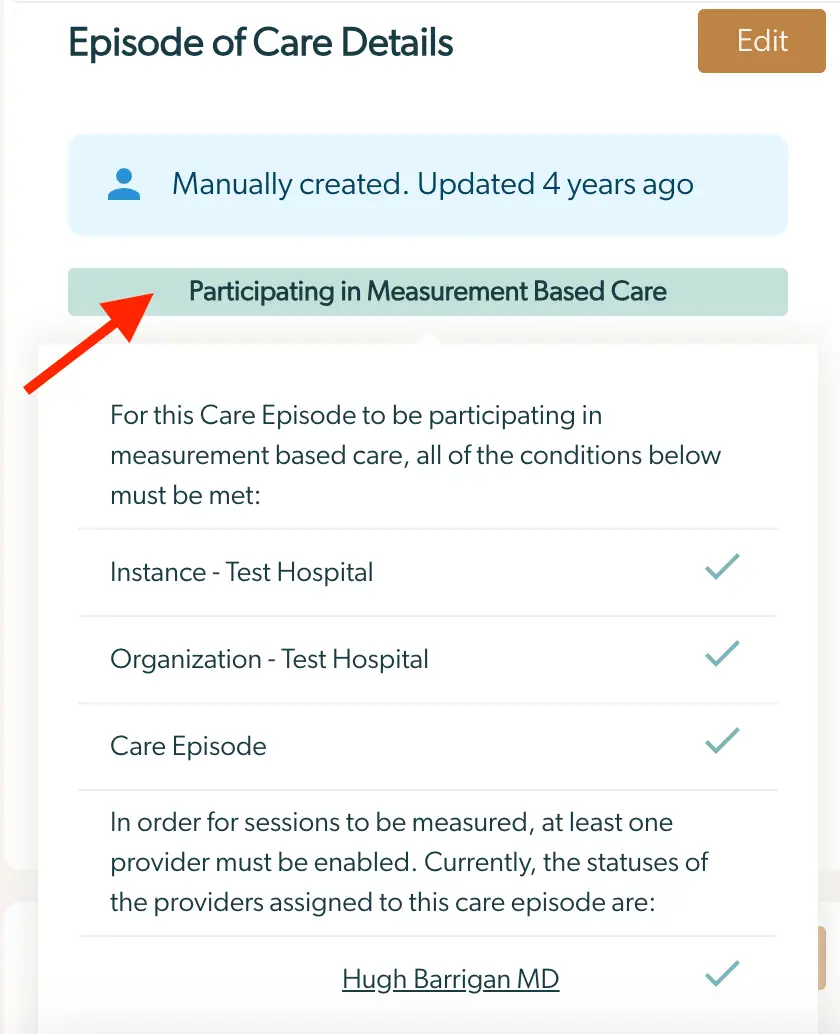
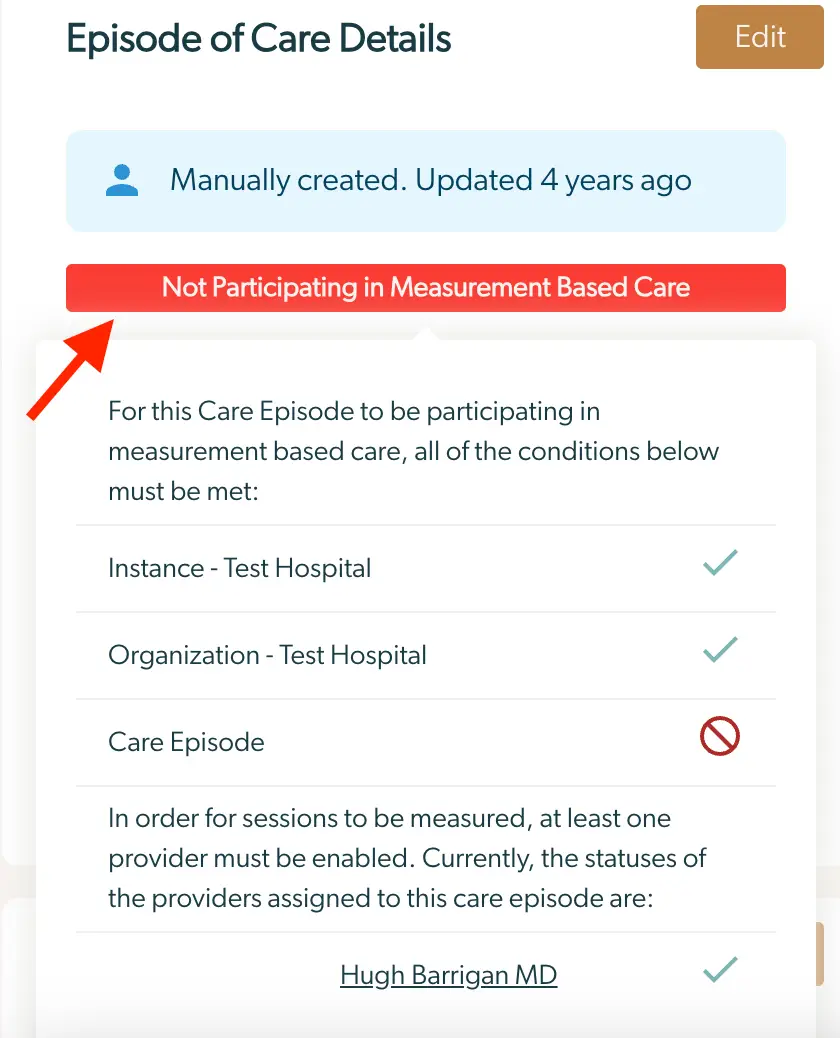
The screenshot displays the 'Episode of Care Details' page within the Mirah Measurement-Based Care platform. At the top, there is a header indicating the section title. Below it, a blue box shows the status 'Manually created. Updated 4 years ago.' To the right of this box is an 'Edit' button, which allows users to modify the details of the care episode. Beneath the status box, a green banner labeled 'Participating in Measurement Based Care' indicates the involvement in measurement-based care. The main content area lists conditions that must be met for the care episode to participate in measurement-based care, including 'Instance - Test Hospital,' 'Organization - Test Hospital,' and 'Care Episode,' each with a checkmark indicating completion. Additionally, it notes that at least one provider must be enabled for sessions to be measured, with 'Hugh Barrigan MD' listed as a provider assigned to this care episode, also marked with a checkmark.The screenshot displays the 'Episode of Care Details' page, which provides information about a specific care episode. At the top, there is a status indicator showing 'Manually created. Updated 4 years ago' in a blue box, indicating the creation and last update time of the episode. Below this, a red banner states 'Not Participating in Measurement Based Care,' highlighting that the episode is not currently involved in measurement-based care. The page lists conditions that must be met for participation, including 'Instance - Test Hospital' and 'Organization - Test Hospital,' both marked with checkmarks indicating they are fulfilled. The 'Care Episode' condition is marked with a prohibition symbol, indicating it is not met. A note explains that at least one provider must be enabled for sessions to be measured, and lists 'Hugh Barrigan MD' as a provider with a checkmark next to their name, indicating they are enabled. An 'Edit' button is located at the top right corner, allowing users to modify the episode details.

Additional Resources​

View Automatic Planning of measures

Understanding Measures Cadence