
Episodes of Care (EoC)

An Episode of Care (EoC) represents a specific duration of time when a patient receives care from an assembled care team. During an EoC, the patient will meet with the people in their care team and work to make progress in their treatment goals.

1). The details of a patients EOC can be found by going to the Patient Record, and scrolling down until you reach "Episodes of Care". From here, you can click on "Details" to be brought to the details page for any EOC the patient is/was active in.
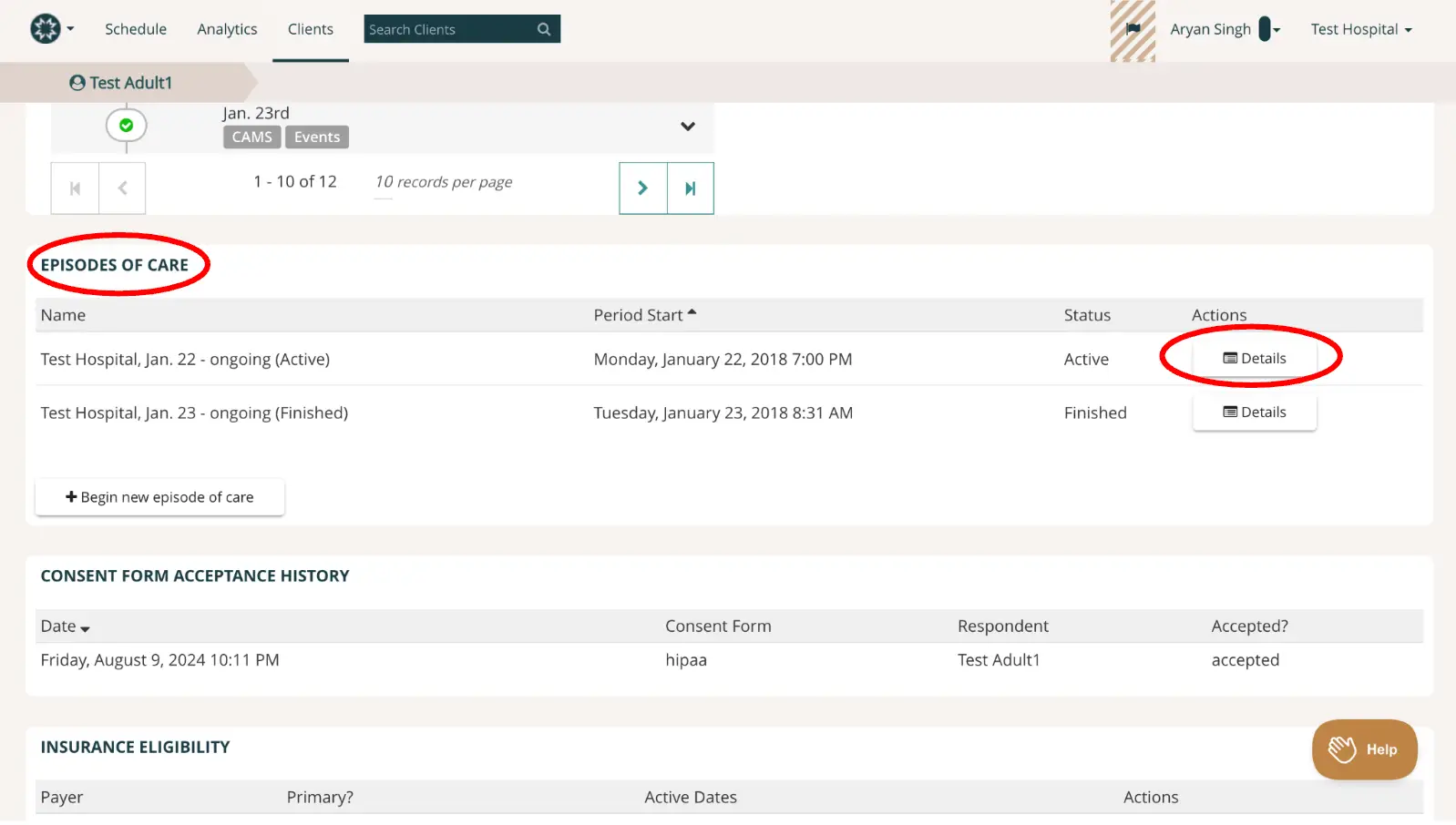
The screenshot displays the 'Episodes of Care' section within the Mirah Measurement-Based Care platform, specifically under the 'Clients' tab. It shows a list of episodes associated with a patient named 'Test Adult1'. Each episode is listed with its name, period start date, status, and an action button labeled 'Details' located on the right side for each entry. The first episode is labeled 'Test Hospital, Jan. 22 - ongoing (Active)' with a start date of Monday, January 22, 2018, at 7:00 PM and is marked as 'Active'. The second episode is 'Test Hospital, Jan. 23 - ongoing (Finished)' with a start date of Tuesday, January 23, 2018, at 8:31 AM and is marked as 'Finished'. Below the episodes list, there is a button labeled '+ Begin new episode of care' for initiating a new episode. The screen also includes sections for 'Consent Form Acceptance History' and 'Insurance Eligibility'. The 'Consent Form Acceptance History' shows a record with a date, consent form type 'hipaa', respondent 'Test Adult1', and status 'accepted'. The 'Insurance Eligibility' section lists 'Payer' and 'Primary?' with no specific details filled in. The top navigation bar includes options for 'Schedule', 'Analytics', and 'Clients', with a search bar to find clients. The user is identified as 'Aryan Singh' associated with 'Test Hospital'. A 'Help' button is located at the bottom right corner of the screen.

2). The EOC details page contains a variety of information on the patient and the specifics of the episode.