
How to Find Session Communication Details

In some instances, it may be unclear if clients are receiving important emails regarding their assessments, progress, etc. The main place in Mirah to review this will be in session details for past sessions, which details the communications occurring between a care team and patients/caregivers.

How to Find Communication Details in Session Details​

1). From the patient dashboard, look towards the bottom-left of the screen and see "Past Sessions". Click on "Details" for the appointment in question.
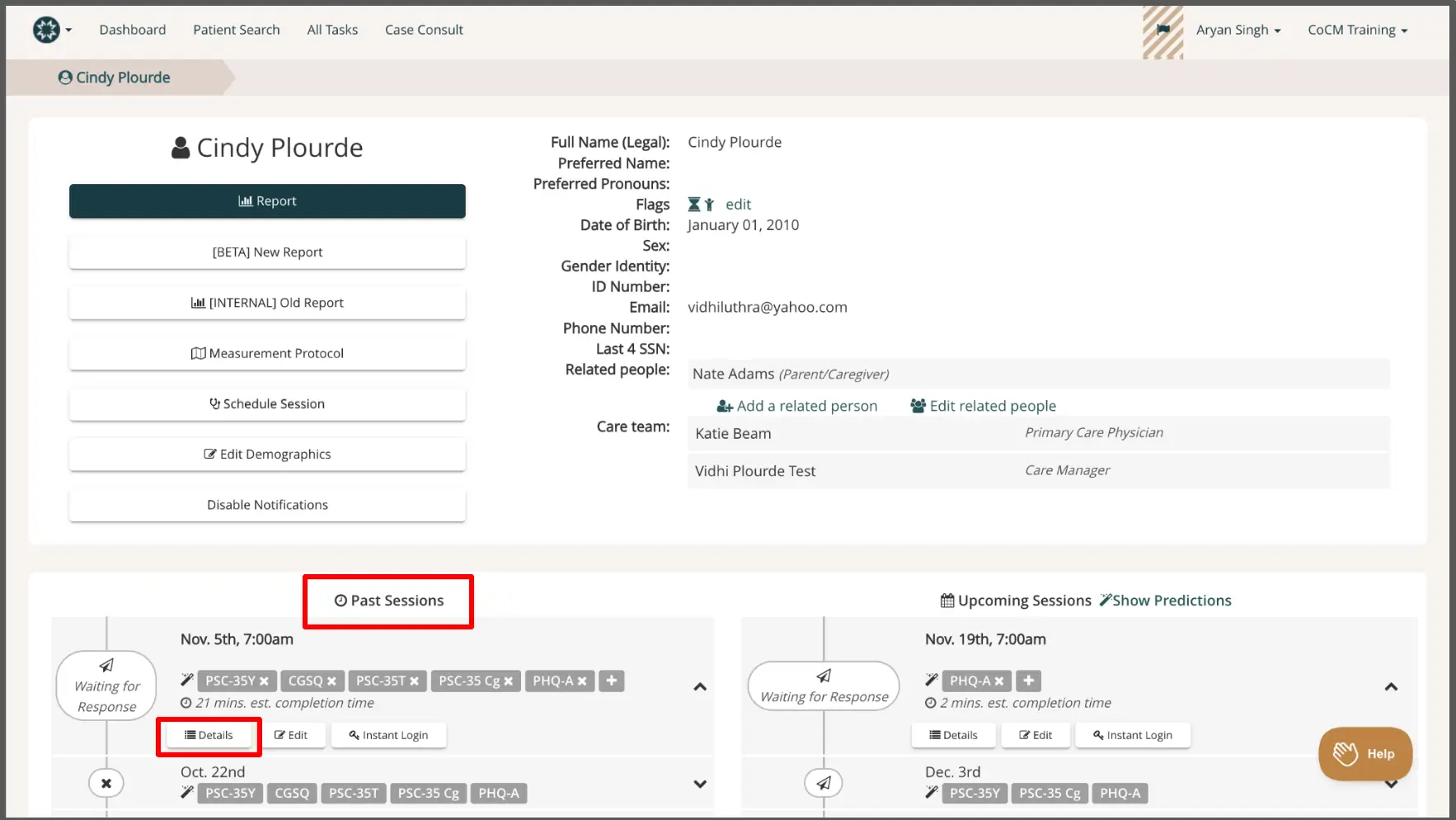
The screenshot displays the patient profile page for Cindy Plourde within the Mirah Measurement-Based Care platform. The top navigation bar includes options for Dashboard, Patient Search, All Tasks, and Case Consult, with the user's name, Aryan Singh, and training status, CoCM Training, shown on the right. The breadcrumb trail indicates the current page is Cindy Plourde's profile. The left section lists various actions such as generating a new report, accessing an old report, viewing measurement protocols, scheduling sessions, editing demographics, and disabling notifications. The right section provides personal details including full name, preferred name, preferred pronouns, flags, date of birth, sex, gender identity, ID number, email, phone number, last four digits of SSN, related people, and care team members. Below, the Past Sessions section is highlighted, showing a session on November 5th at 7:00 am with details like assessment types, estimated completion time, and options to view details, edit, or perform an instant login. The Upcoming Sessions section is also visible, showing a session on November 19th at 7:00 am with similar options.

2). After clicking on Details, you will see details about the patient, their caregiver, and information of when and how the measures for that session were sent to them.
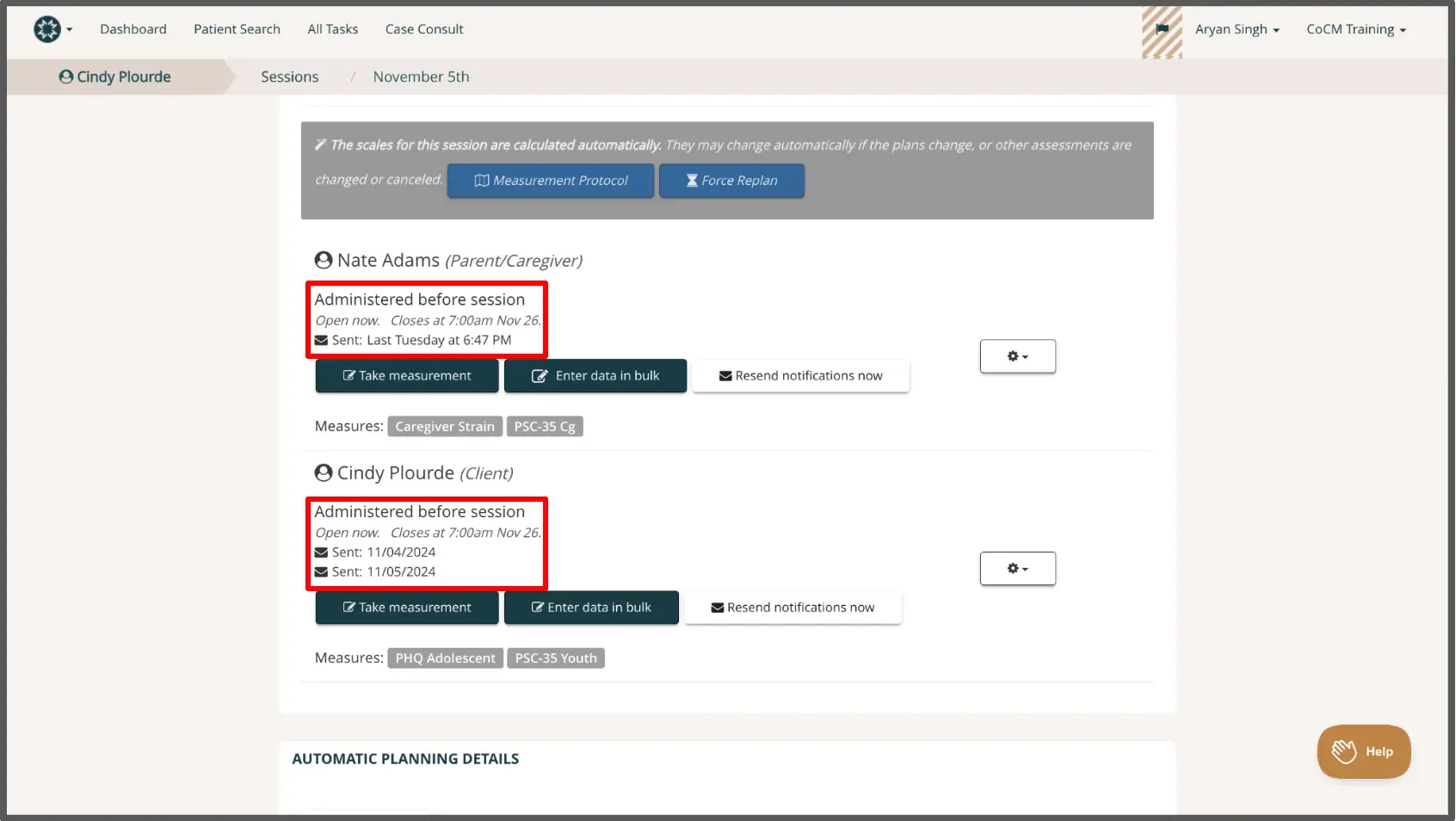
The screenshot displays the session communication details for Cindy Plourde on November 5th. At the top, the navigation bar includes options such as Dashboard, Patient Search, All Tasks, and Case Consult. The breadcrumb trail shows Cindy Plourde > Sessions > November 5th, indicating the user's current location within the application. Below, there are sections for Nate Adams (Parent/Caregiver) and Cindy Plourde (Client), each showing the status 'Administered before session' with the open and close times. For Nate Adams, the session was sent last Tuesday at 6:47 PM, and for Cindy Plourde, it was sent on 11/04/2024 and 11/05/2024. Each section includes buttons for 'Take measurement' and 'Enter data in bulk', with a 'Resend notifications now' button located to the right. The measures listed for Nate Adams are Caregiver Strain and PSC-35 Cg, while for Cindy Plourde, they are PHQ Adolescent and PSC-35 Youth. The page also features a 'Measurement Protocol' and 'Force Replan' button at the top, and a 'Help' button at the bottom right corner.

If the information in the session details doesn't explain why clients aren't receiving emails, please contact support@mirah.com for further assistance.