
Resending Measures to Patients

If the session time is still open, To resend measures notifications to patients, first navigate to their Detail page from the Dashboard, Client tab, or via the search function.
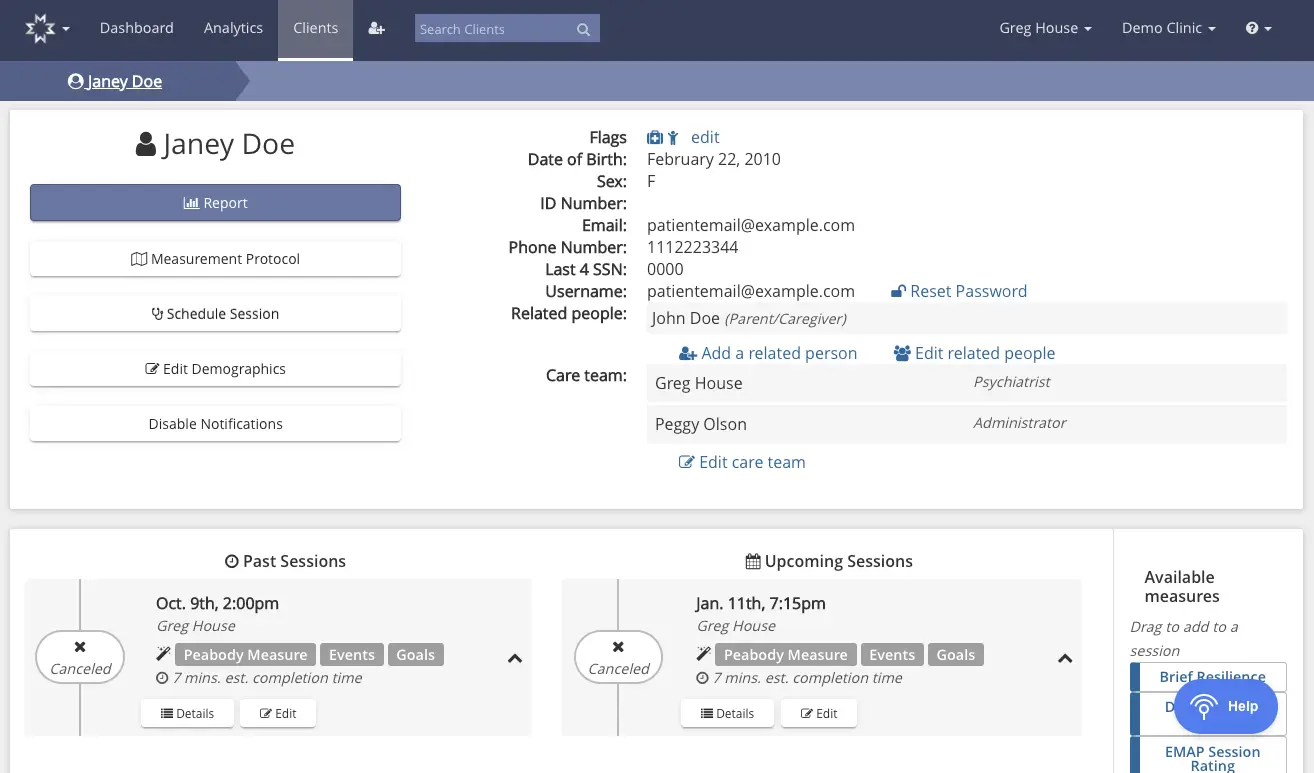
The screenshot displays the client profile page for Janey Doe within the Mirah Measurement-Based Care platform. The top navigation bar includes options for Dashboard, Analytics, and Clients, with a search bar for finding clients. The page is titled with the client's name, Janey Doe, and features a breadcrumb trail indicating the current location within the Clients section. On the left, there are buttons for Report, Measurement Protocol, Schedule Session, Edit Demographics, and Disable Notifications, each serving specific functions for managing client interactions and data. The right side of the page provides detailed client information, including flags, date of birth, sex, ID number, email, phone number, last four digits of SSN, and username. There are options to reset the password, add or edit related people, and edit the care team, which currently includes Greg House and Peggy Olson. Below, the page is divided into sections for Past Sessions and Upcoming Sessions, each listing session details such as date, time, and associated measures, with options to view details or edit the sessions. The Past Sessions section shows a canceled session on Oct. 9th, 2:00 pm with Greg House, while the Upcoming Sessions section lists a canceled session on Jan. 11th, 7:15 pm. On the right, there is a panel for Available measures, which can be dragged to add to a session, and a Help button is located at the bottom right corner.

Locate the session for which you would like to resend a measures notification to the patient. Then, click "Details" under that appointment.
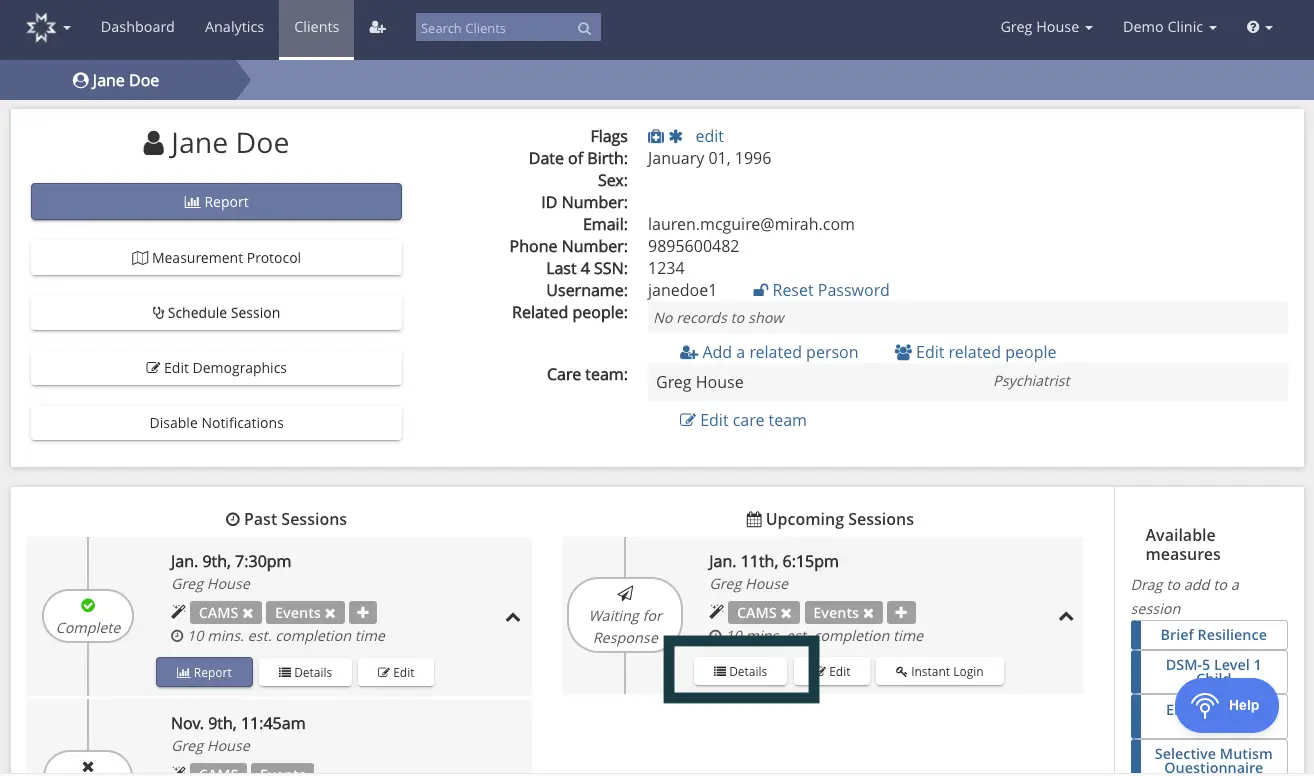
The screenshot displays the client profile page for Jane Doe within the Mirah Measurement-Based Care platform. The top section includes Jane Doe's personal information such as date of birth, sex, ID number, email, phone number, last 4 digits of SSN, and username. There are options to edit flags, reset password, add or edit related people, and edit the care team, which currently includes Greg House, a psychiatrist. The left side features buttons for generating a report, accessing the measurement protocol, scheduling a session, editing demographics, and disabling notifications. Below, past and upcoming sessions are listed with details such as date, time, care team member, and estimated completion time. Each session has buttons for report generation, viewing details, and editing, with the 'Details' button highlighted for the upcoming session on January 11th at 6:15 pm. The right side of the screen shows available measures that can be dragged into a session, including Brief Resilience, DSM-5 Level 1 Child, and others.

On the Details page for the session, click "Resend notifications now," to resend the measures notification to the patient. This must be done separately for each person send measures initially (for example, you must resend notifications separately to a patient and then to their caregiver).
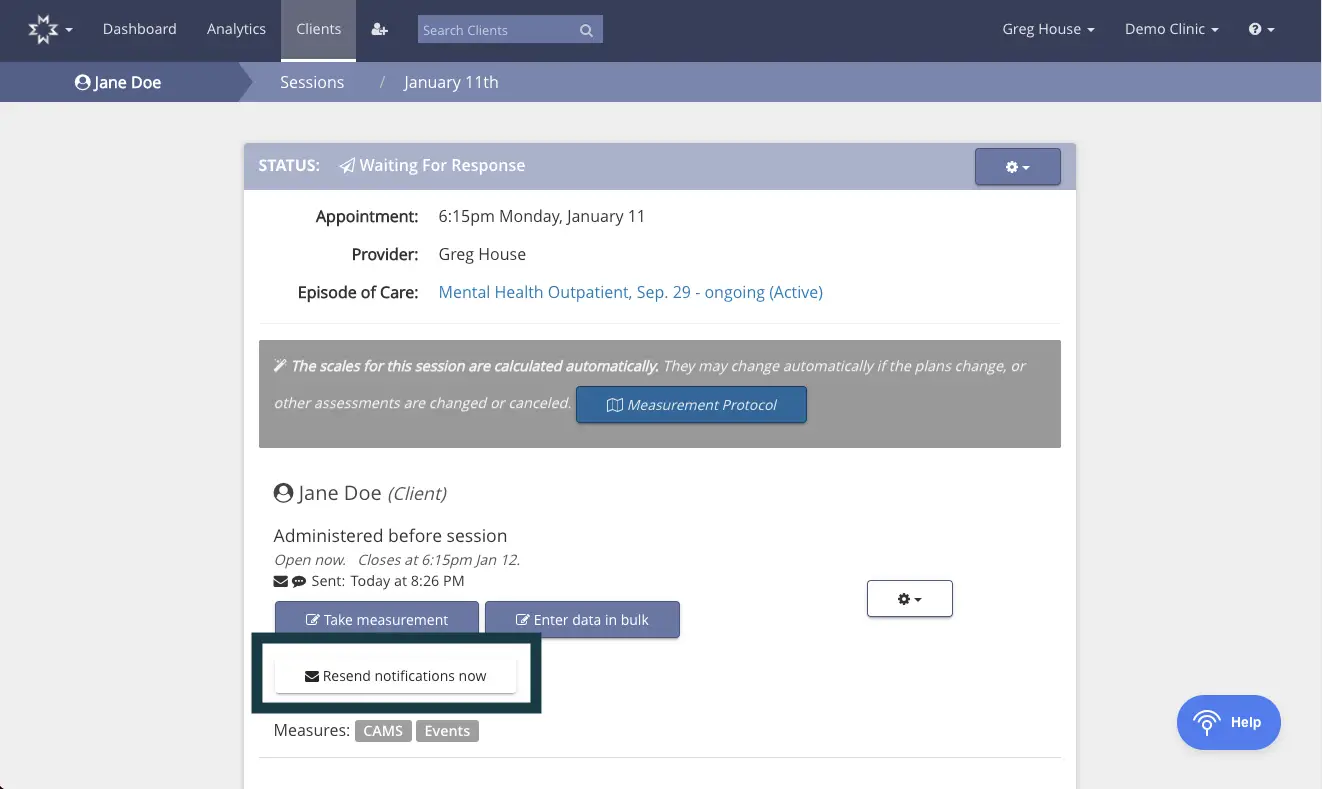
The screenshot displays the interface for managing a client's session within the Mirah Measurement-Based Care platform. At the top, the breadcrumb navigation indicates the user is viewing details for Jane Doe's session on January 11th. The status bar shows 'Waiting For Response' with details of the appointment scheduled at 6:15 PM on Monday, January 11, with provider Greg House, under the episode of care 'Mental Health Outpatient, Sep. 29 - ongoing (Active)'. Below, a gray box notes that scales for the session are calculated automatically, with a 'Measurement Protocol' button to the right for accessing protocol details. The section for Jane Doe (Client) indicates measures administered before the session, open now and closing at 6:15 PM on January 12, with a timestamp showing the notification was sent at 8:26 PM. Two buttons are available: 'Take measurement' and 'Enter data in bulk', both located centrally. Below these, a 'Resend notifications now' button is highlighted, allowing the user to resend notifications to the client. Measures are categorized as CAMS and Events. The interface includes a help button in the bottom right corner for user assistance.

If the session time has passed (Resending notifications for past sessions):​

If the session time has already occurred, follow the same procedure as above, (Dashboard > Patient Detail page > "Details" under session date). Then, click "Reopen this invitation for 24 hours."
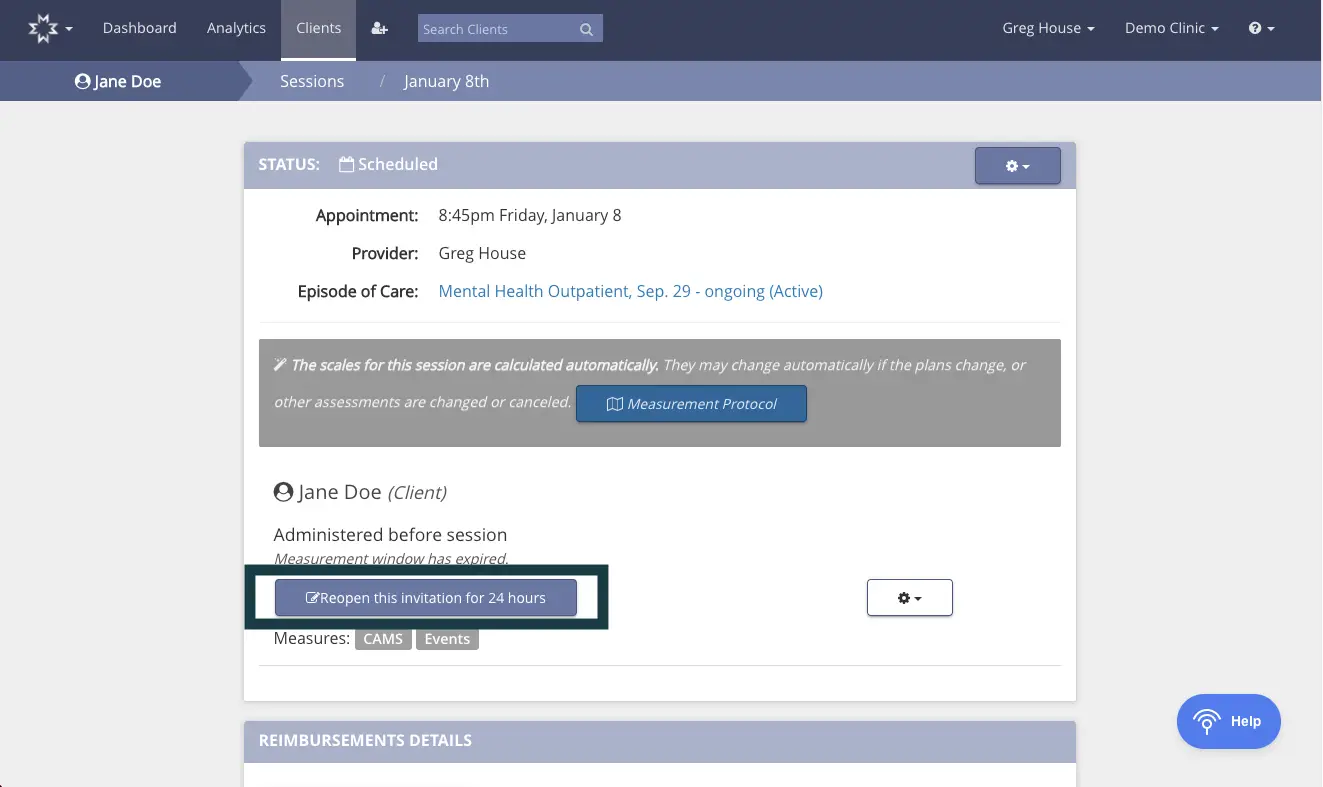
This screen is part of the Mirah Measurement-Based Care platform, specifically for managing client sessions. It displays the session details for Jane Doe, including the appointment time, provider name, and episode of care. The status of the session is marked as 'Scheduled'. There is a notification indicating that the scales for the session are calculated automatically, with a button labeled 'Measurement Protocol' for further details. Below this, the client's name is shown with a note that the measurement window has expired. A prominent button labeled 'Reopen this invitation for 24 hours' is available to extend the measurement window. Measures related to CAMS and Events are listed. The screen also includes a settings button for additional options and a 'Help' button located at the bottom right corner for user assistance.

After reopening the invitation, the page will refresh. You will see an option to "Send notifications now," click this button to resend notifications to the patient and/or caregiver.
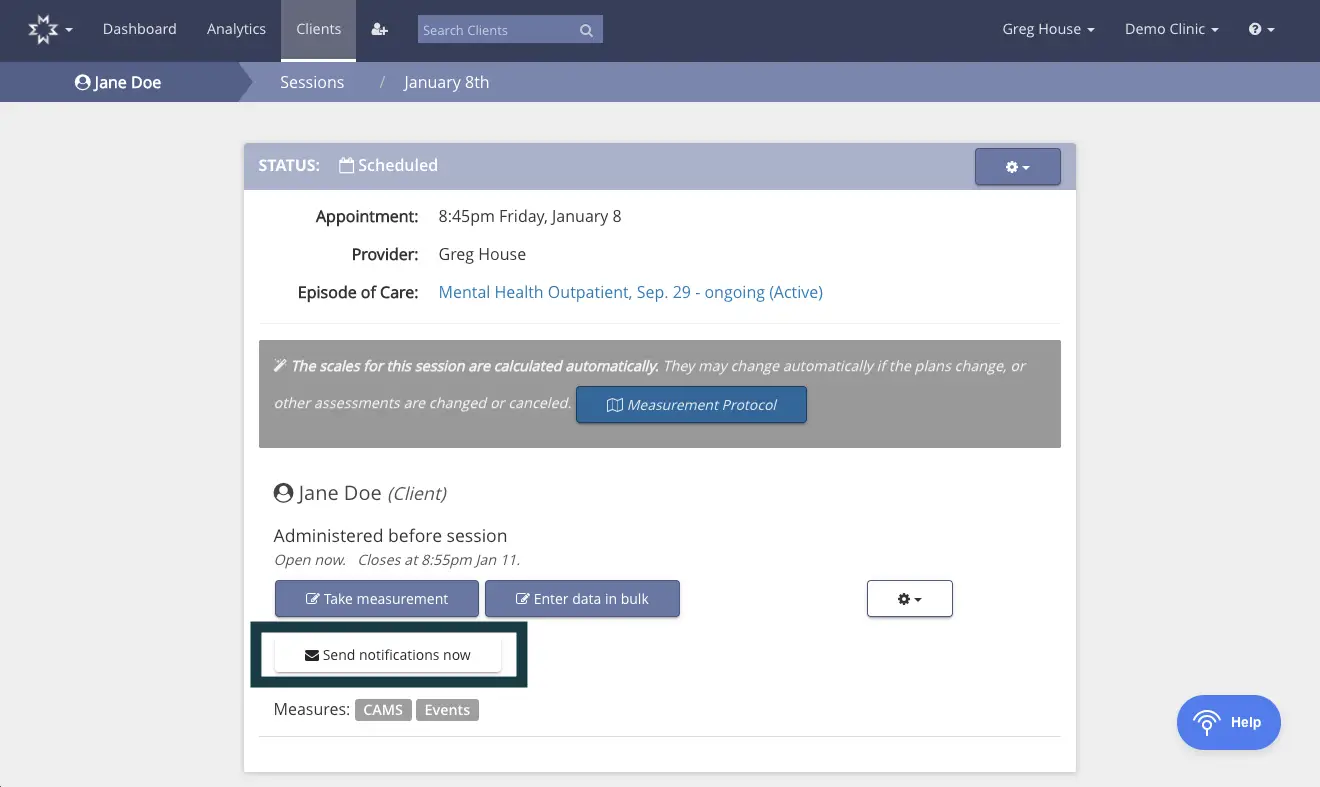
The screenshot displays the session details for a client named Jane Doe, scheduled for an appointment at 8:45 pm on Friday, January 8, with provider Greg House. The episode of care is labeled as Mental Health Outpatient, Sep. 29 - ongoing (Active). The status of the session is marked as Scheduled. There is a note indicating that the scales for the session are calculated automatically and may change if plans or assessments are altered. A button labeled 'Measurement Protocol' is available for further details. Below the session details, Jane Doe is listed as the client, with measures administered before the session, open now and closing at 8:55 pm on January 11. Two buttons are present: 'Take measurement' and 'Enter data in bulk', both located next to the client's name. A 'Send notifications now' button is highlighted, allowing notifications to be sent immediately. Measures are categorized under CAMS and Events. The top navigation bar includes options for Dashboard, Analytics, and Clients, with a search bar for finding clients. The user is identified as Greg House, associated with Demo Clinic, and a help button is located at the bottom right corner.