
The Non-billable Time Page

This page describes a Mirah feature that hasn't been deployed for all customers yet. If you don't have access to this feature yet and you're interested in getting it, contact Mirah support.

On the top right of the My Time page, there's a link to the Non-billable Time page:

The 'My Time' page in the Mirah Collaborative Care platform is designed for managing non-billable time. At the top left, there is a 'Log Time' button for recording time entries. Below, a search field allows users to filter entries. Next to it, a 'Time Range' dropdown menu lets users select the period for viewing time entries, with options like 'Weekly'. Navigation arrows allow users to move between time periods. The 'Day' field displays the selected date, with a calendar icon for date selection. On the right, 'Additional Filters' and 'Clear Filters' buttons provide options to refine or reset the search criteria. The 'Non-billable Time' link at the top right indicates the current page context.

This page shows a list of time you've logged in the current month where all or part of that time isn't counted as billable, sorted from most to least non-billable time:
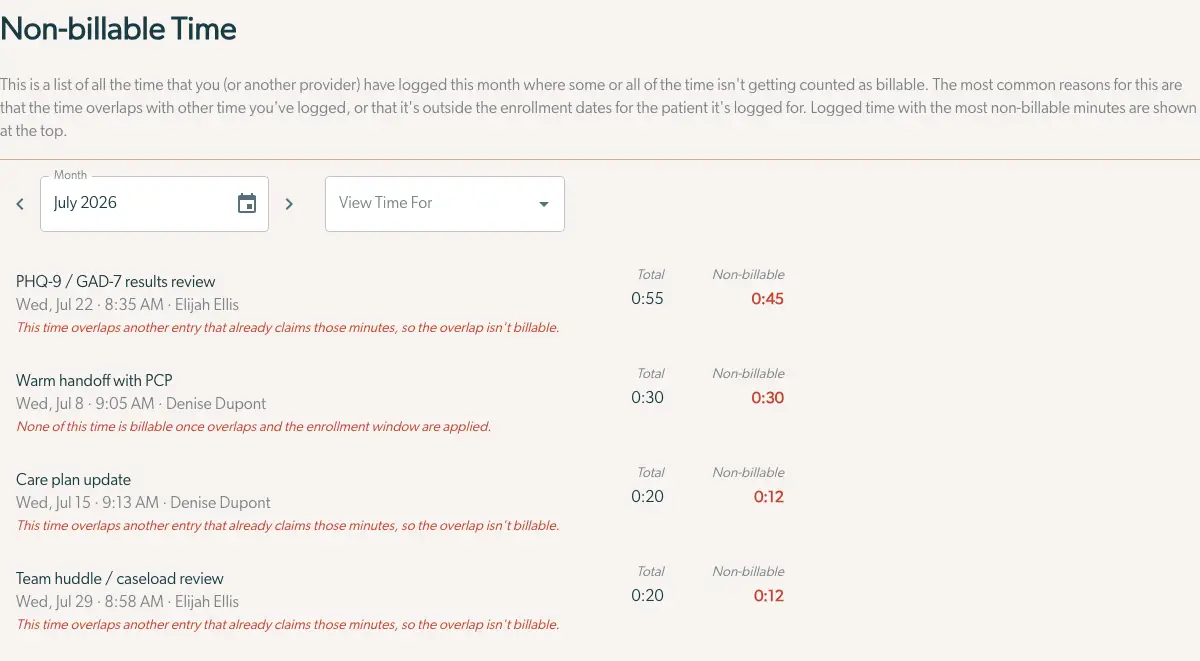
The Non-billable Time page in Mirah Collaborative Care displays a list of time entries logged by a provider that are not counted as billable. At the top, there is a heading 'Non-billable Time' followed by an explanation of why time might not be billable. Below, there are controls to select the month and view time for specific criteria. The month is selectable via a dropdown and calendar icon, with navigation arrows on either side. A dropdown menu labeled 'View Time For' allows filtering. The main section lists activities such as 'PHQ-9 / GAD-7 results review' and 'Warm handoff with PCP,' each with a date, time, and provider name. Each entry shows the total time and non-billable time, with reasons for non-billability noted in red text. The total and non-billable times are displayed on the right side of each entry.

You can use the month selector and left/right buttons to change which month you're looking at, or select another provider to view their non-billable time.

Each time entry comes with a explanation of why the time isn't billable. The most common reason is that a time entry overlaps with another one at the same time and so only the non-overlapping parts are billable. This is generally easy to spot on the calendar view. The reasons that aren't easy to spot on the calendar have to do with the enrollment dates for the patient the time is logged for - time is only billable between the patient's consent date and discharge date, so if a patient has never been enrolled into collaborative care, or the time was logged outside the consent to discharge window, it won't be counted for billing.

Clicking on any time entry on the page will open a dialog to edit the time entry, for the cases when that's the best way to recover the non-billable time.