
Monthly Documentation of Time and Tasks

This workflow is designed to support end of the month documentation of all tracked minutes for a given patient in a way that can be easily copied into the client’s record in the EHR.

First, navigate to the patient for whom you are creating documentation. Once on the patient’s page, look on the right half of the page for the Tasks panel. Click on the orange “Filters” button.
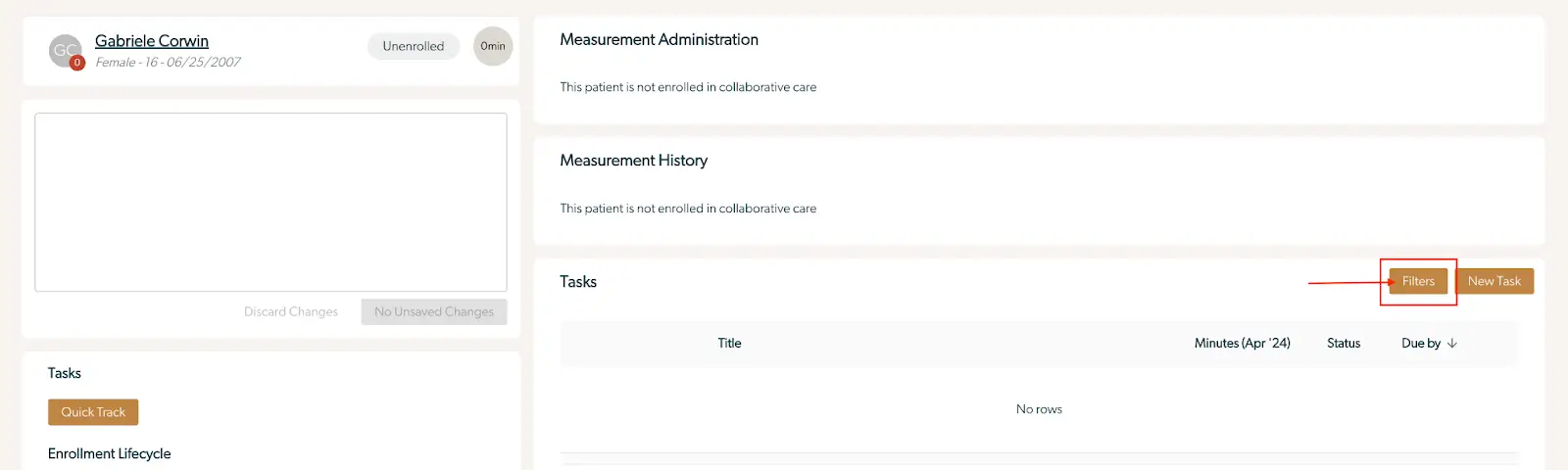
The screenshot displays the task management interface for a patient named Gabriele Corwin, who is unrolled from collaborative care. The top section shows the patient's name, gender, and birth date, along with their enrollment status and time spent in care, which is currently zero minutes. Below this, there are sections for Measurement Administration and Measurement History, both indicating that the patient is not enrolled in collaborative care. The Tasks section is visible, featuring a table with columns for Title, Minutes (Apr '24), Status, and Due by, but currently shows 'No rows', indicating no tasks are listed. To the right of the Tasks section, there are two buttons: 'Filters' and 'New Task', both located at the top right corner of the task table. The 'Filters' button allows users to apply filters to the task list, while the 'New Task' button is used to create a new task for the patient.

You will now see additional fields in the Tasks section. This field will automatically default to the current month until the filters are changed. Select the month for which you are documenting using the "Year and Month" field.
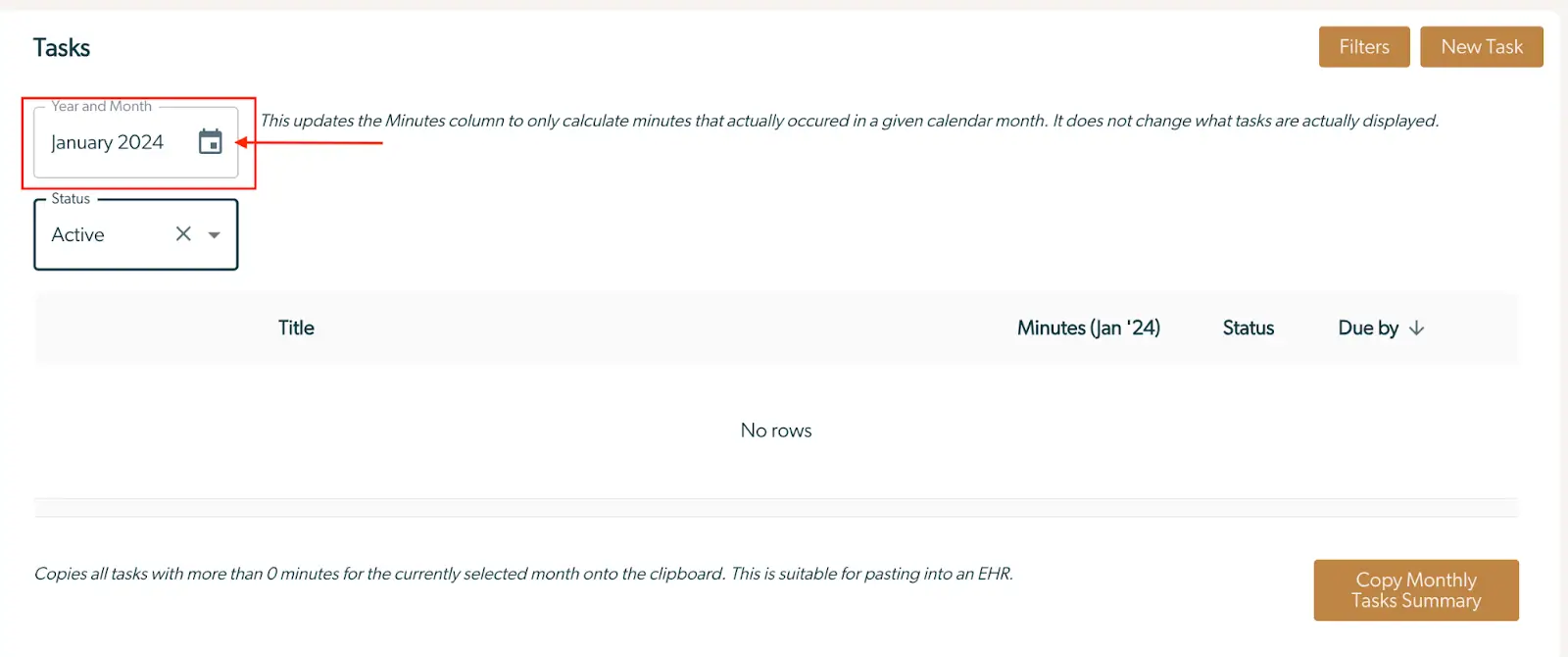
The screenshot displays the 'Tasks' section of the Mirah Collaborative Care platform, focusing on the monthly documentation of time and tasks. At the top left, there is a 'Year and Month' field set to January 2024, accompanied by a calendar icon for date selection. Below it, the 'Status' field is set to 'Active' with a dropdown menu for filtering tasks by their status. The main table is empty, indicating 'No rows' under columns titled 'Title', 'Minutes (Jan '24)', 'Status', and 'Due by', which are meant to display task details. At the top right, there are two buttons: 'Filters' and 'New Task', for applying filters and creating new tasks respectively. At the bottom right, the 'Copy Monthly Tasks Summary' button allows users to copy tasks with more than 0 minutes for the selected month to the clipboard, suitable for pasting into an EHR.

Click on the "Copy Monthly Tasks Summary" button in the bottom right corner. This will copy all tasks with more than 0 minutes for the selected month onto your clipboard. You can then paste the Monthly Tasks Summary directly into the patient’s chart in the EHR.
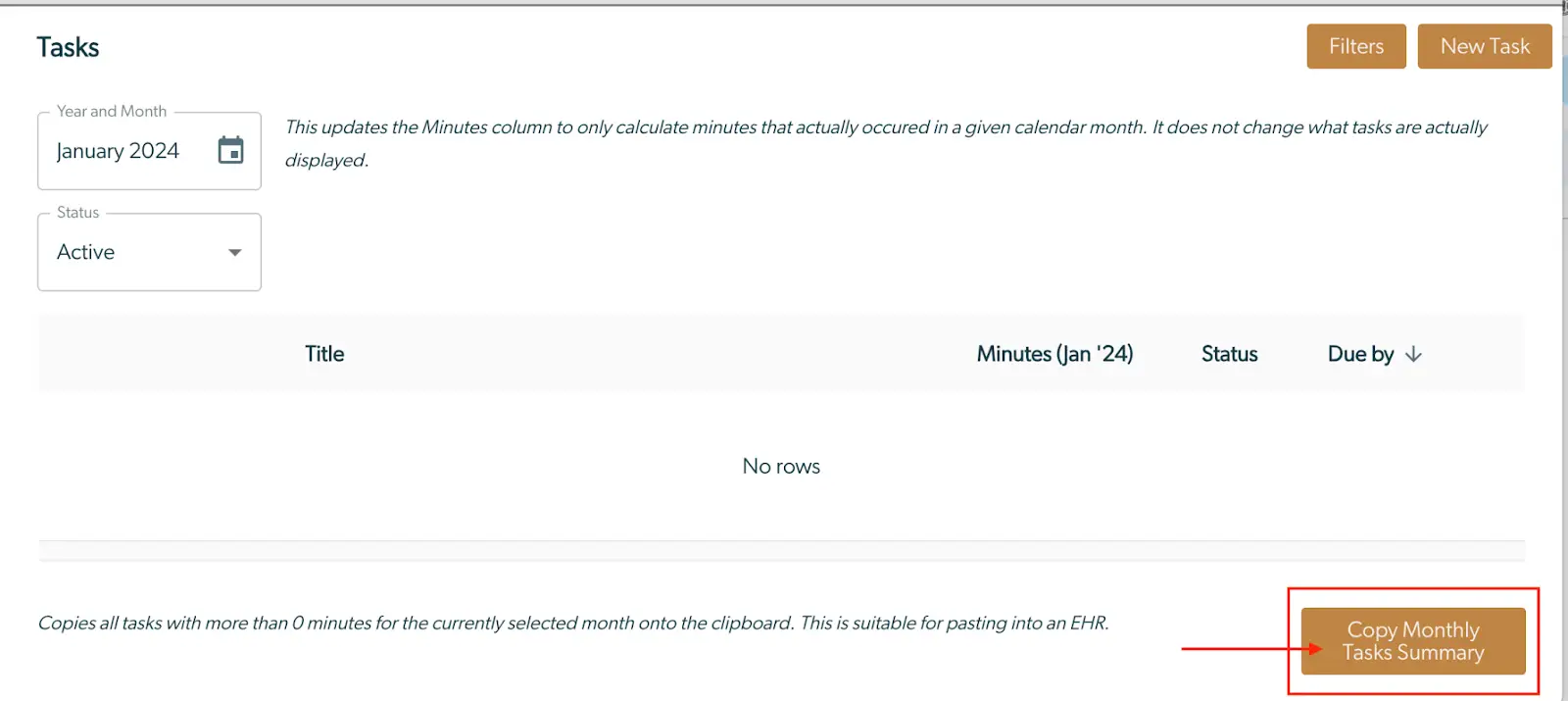
The screenshot displays the 'Tasks' section of the Mirah Collaborative Care platform, specifically for documenting time and tasks on a monthly basis. At the top, there are two dropdown fields: 'Year and Month' set to January 2024, and 'Status' set to Active, allowing users to filter tasks by date and status. Below these fields, a message explains that the Minutes column calculates only the minutes that occurred in the selected month without altering the actual tasks displayed. The main table is empty, showing 'No rows' under columns titled 'Title', 'Minutes (Jan '24)', 'Status', and 'Due by'. At the bottom right corner, there is a button labeled 'Copy Monthly Tasks Summary', which copies tasks with more than 0 minutes for the selected month to the clipboard, suitable for pasting into an EHR. The 'Filters' and 'New Task' buttons are located at the top right corner of the screen.

The text copied into the EHR will look something like the following (may vary slightly in your EHR):
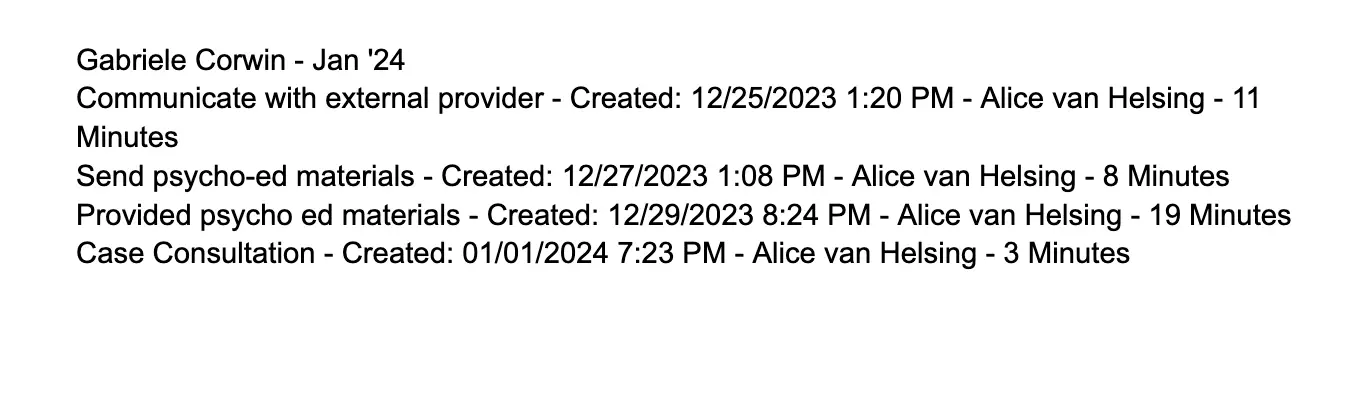
The screenshot displays a list of tasks associated with Gabriele Corwin for January 2024, detailing collaborative care activities. Each task includes a description, creation date and time, the responsible provider Alice van Helsing, and the duration in minutes. The tasks listed are 'Communicate with external provider' created on December 25, 2023, at 1:20 PM for 11 minutes, 'Send psycho-ed materials' created on December 27, 2023, at 1:08 PM for 8 minutes, 'Provided psycho ed materials' created on December 29, 2023, at 8:24 PM for 19 minutes, and 'Case Consultation' created on January 1, 2024, at 7:23 PM for 3 minutes. This screen is part of the monthly documentation of time and tasks feature within the collaborative care module.

You may always format or edit the text once it is in the EHR before finalizing your documentation.

**Please note: this text does contain PHI (the patient's full name will be included), so please be cautious with where this information is pasted.