
Tablet - Key Code to Access Assessments

Two Ways to access tablet key codes in the office:​

Under the Awaiting Response Tab:

1). On the Dashboard, click on Awaiting Response Tab and find the client you need a keycode for.

2). Click the Key button on the right side of the dashboard

The screenshot displays the 'Awaiting Response' tab within the Mirah Collaborative Care platform, which is part of the 'Dashboard' section. This screen is used to manage client assessments that are pending responses. The top navigation bar includes options for Dashboard, Analytics, and Clients, along with a search bar for searching clients. The user is identified as Greg House from Demo Clinic. The screen lists clients with their names, scheduled assessment times, and notification statuses. Each client row includes a 'Details' button and a key icon button for accessing assessments, located to the right of the client information. The 'Awaiting Response' tab is highlighted, indicating that there are six assessments pending responses. The bottom of the screen provides a legend explaining the meaning of icons next to client names, such as worsening or improving severity and age indication.

3). A pop out window will open with the keycode to type into the tablet.

The screenshot displays the Mirah Collaborative Care interface, specifically the 'Dashboard' section. It shows a pop-up window that provides a key code for accessing assessments on a client's tablet or phone. The pop-up suggests using the code if there are issues signing in a client with their details. The code 'ogzexk' is displayed prominently, along with the client's name, James Gray, and a note that the code expires in 15 minutes. Below the code, there is a 'Close' button to dismiss the pop-up. The background shows a list of clients with their scheduled times and completed status, along with options to view details or use a key code for each client. The top navigation bar includes links to 'Dashboard', 'Analytics', and 'Clients', along with a search bar, user profile options, and a help icon.

Search for a client and go to the client Detail Page:

1). Search for client. In this example we are searching for "James Gray":

The screenshot displays the Mirah Collaborative Care interface, specifically the dashboard view for managing client assessments. At the top, there is a navigation bar with tabs for Dashboard, Analytics, and Clients, along with user information for Greg House and Demo Clinic. A search bar is highlighted in red, allowing users to search for clients by name. Below the navigation bar, there are filter options for Provider, Unit, and Flags, with a checkbox for Test clients. The main section shows a table with columns labeled Client, Scheduled, Completed, and Severity. Each row represents a client, with their name, scheduled assessment time, completion status, and severity indicator. The severity is depicted using colored icons, and each row has a 'Report' button on the right for generating client reports. A 'Help' button is located at the bottom right corner of the screen.

2). Click on "Detail" under Actions column:
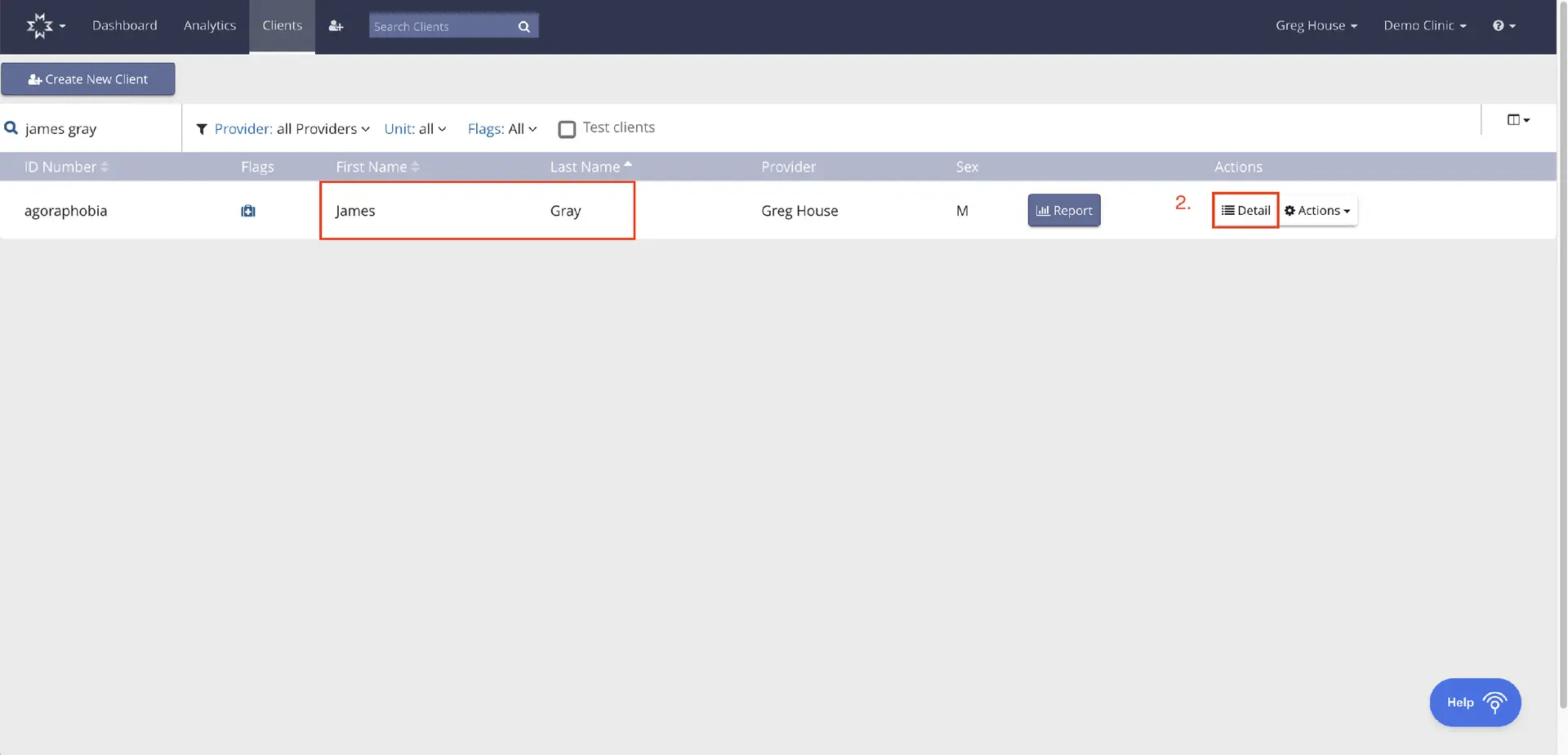
The screenshot displays the 'Clients' section of the Mirah Collaborative Care platform, where users can manage client information. At the top, there is a navigation bar with options for Dashboard, Analytics, and Clients, along with a search bar labeled 'Search Clients'. Below the navigation bar, there is a button labeled 'Create New Client' for adding new client profiles. The main area shows a list of clients with columns for ID Number, Flags, First Name, Last Name, Provider, Sex, and Actions. The client listed is James Gray, with the condition 'agoraphobia' under ID Number, and Greg House as the provider. The Actions column includes a 'Report' button and a 'Detail' button, which are used to view client reports and details, respectively. The 'Actions' dropdown menu provides additional options for client management. The 'Help' button is located at the bottom right corner for user assistance.

3). Click on "Instant Login" button under Upcoming Sessions:
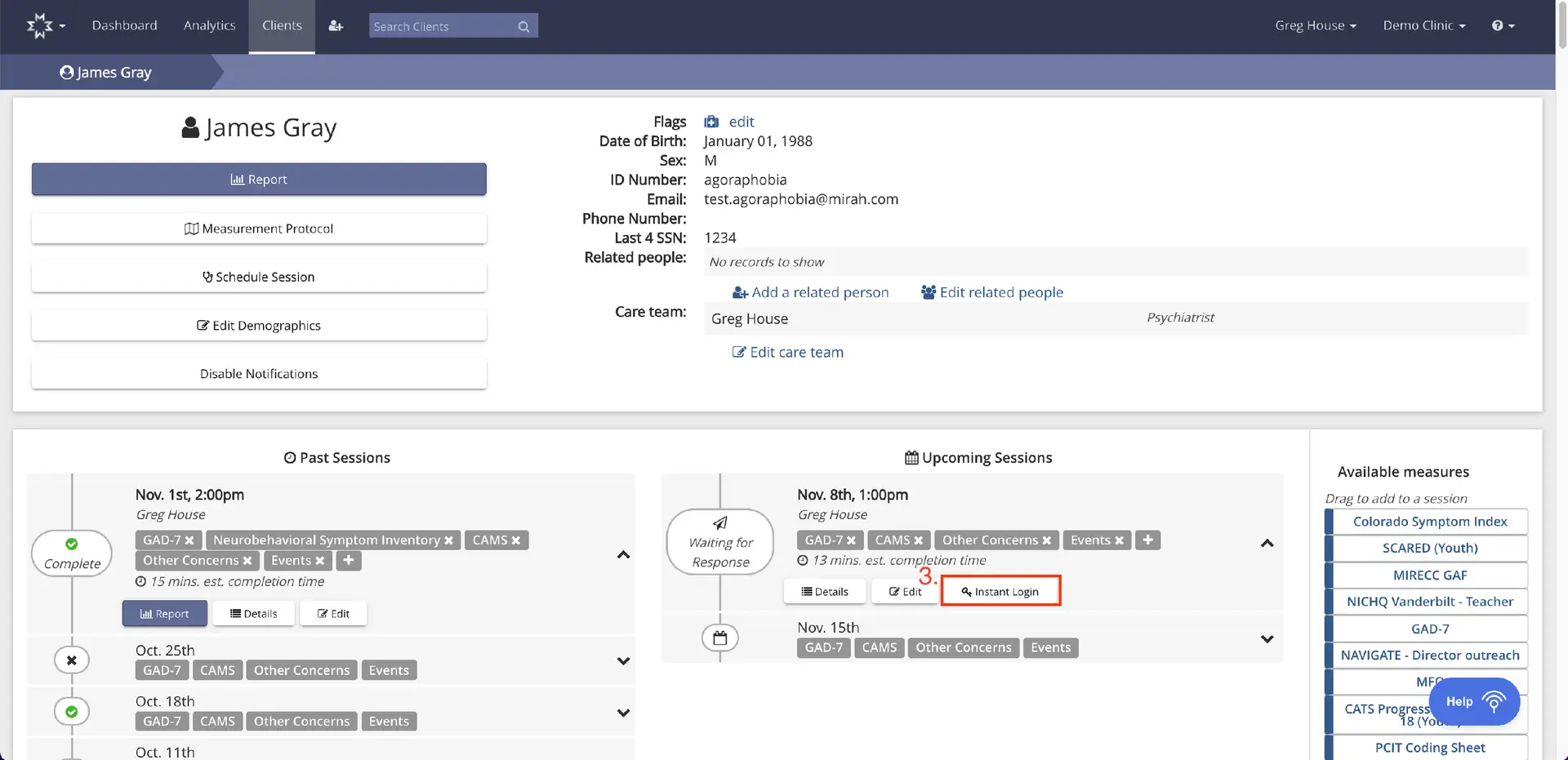
The screenshot displays the client profile page for James Gray within the Mirah Collaborative Care platform. At the top, the navigation bar includes options for Dashboard, Analytics, and Clients, with a search bar labeled 'Search Clients' for quick access. The page is divided into sections: the top section shows client details such as name, date of birth, sex, ID number, email, phone number, last 4 SSN, related people, and care team. There are buttons for editing flags, adding related people, and editing the care team. Below, there are buttons for generating a report, accessing the measurement protocol, scheduling sessions, editing demographics, and disabling notifications. The middle section displays past sessions with details like session date, time, associated measures, estimated completion time, and options to view reports, details, or edit the session. The upcoming sessions section lists future appointments with similar details and includes an 'Instant Login' button for quick access, located next to the 'Edit' button. On the right, the 'Available measures' panel allows users to drag and add measures to a session, listing various assessment tools.

4). The below message will pop up with the keycode to type into the tablet:

The screenshot displays the Mirah Collaborative Care interface, specifically the section for accessing assessments using a key code. The screen is focused on the client profile of James Gray, showing his personal details such as date of birth, sex, ID number, email, phone number, and last four digits of SSN. A pop-up window is prominently displayed, providing instructions for using a key code to bypass login issues on a client's tablet or phone. The key code 'zagxep' is shown, along with a note that it expires in 15 minutes. The pop-up includes a 'Close' button at the bottom center to dismiss the window. The top navigation bar includes options for Dashboard, Analytics, and Clients, with a search bar for finding clients. The user logged in is Greg House, associated with Demo Clinic.