Outcomes Framework - Date and Entity
Once you select the template and scale(s), you will immediately see the "Statistic" to the right.
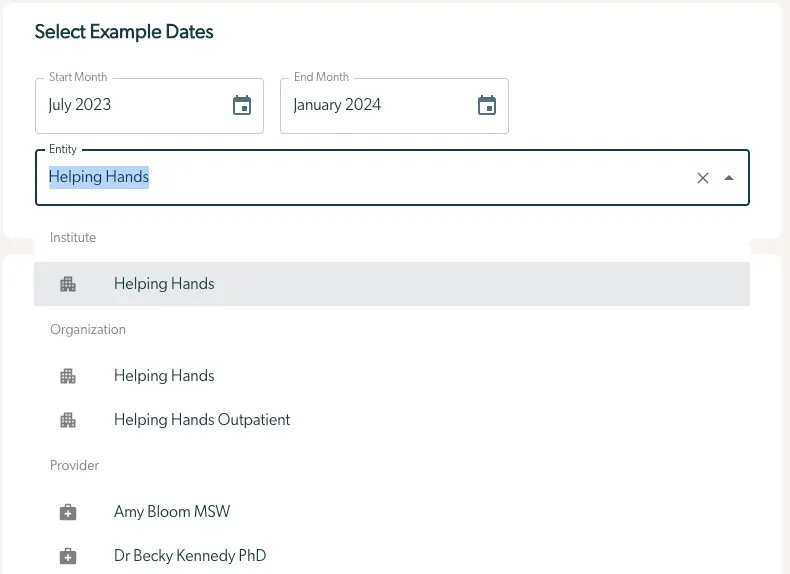
Before we look at the statistics, take a moment to examine the box in the top right titled "Select Example Dates". Here we can set two properties:
- The dates are set by "Start Month" & "End Month". Treatment Episodes that begin between these months will be included. Think of the time between these months as a cohort of patients who started care at the same time. Responses occurring outside of these months will still be included if the initial treatment episode falls within the range. By default this looks at patients that started between 6 and 3 months ago, but you can change this to a larger period if you choose.
- The "Entity" defines a subset of patients who are included based on which part of the organization they are in. Selections can include the whole organization, a particular unit, or even an individual provider. By default, it will display data for the whole organization. Users can select multiple different entities when creating an outcomes metric to track, for example, outcomes for:
- “Sunshine Hospital”, the top level provider.
- “Acute Stabilization Unit”, a particular program inside Sunshine Hospital
- “Dr Smith”, a practitioner who works at both the Acute Stabilization Unit and the Outpatient Therapy unit. Outcomes will include data from both ASU and Outpatient.
- “Adult CBT Bootcamp”, a treatment track.
- “Acute Stabilization Unit” + “Dr Smith” will include only patients of Dr Smith’s who were treated inside the ASU.
- “Acute Stabilization Unit” + “Dr Smith” + “Adult CBT Bootcamp” will include only patients of Dr Smith’s who were treated inside the ASU and enrolled in Adult CBT Bootcamp
Understand the visual representation of this data with the Outcomes Statistics here.