
Patients - The Status Badge

The "Status Badge" is the set of three linked circles that displays a summary of a patient's assessment results as a quick view on a patient's progress in the program.

The assessment results that are shown on the Status Badge depend on the patient's "Active Measurement Bundles". Please note that only enrolled patients have a Status Badge.

The below photo shows an example patient status badge:
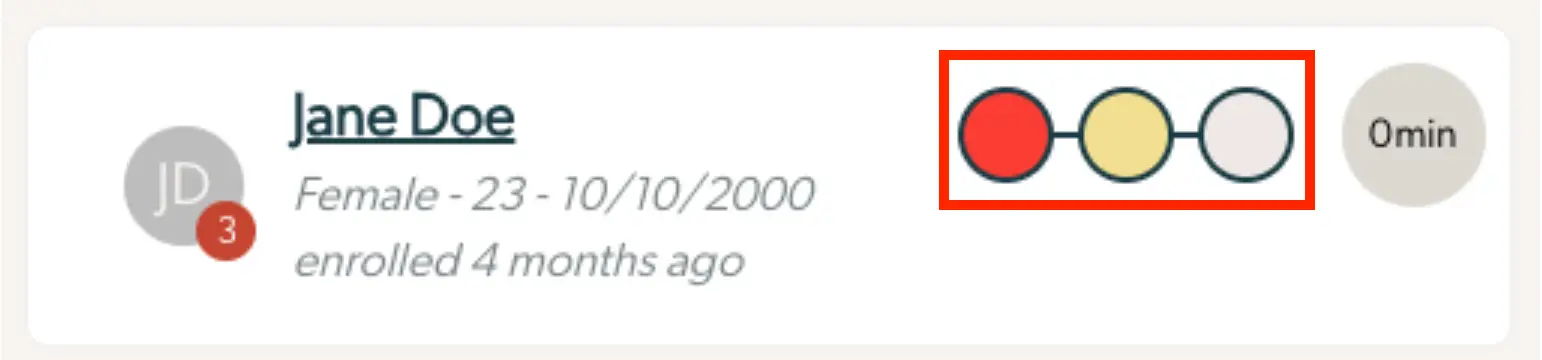
The screenshot displays a patient card for Jane Doe within the Mirah Collaborative Care platform. The card provides essential patient information including the patient's name, gender, age, and date of birth, which is listed as Female - 23 - 10/10/2000. It also notes that the patient was enrolled 4 months ago. On the left side of the card, there is a circular avatar with the initials 'JD' and a red badge with the number 3, indicating notifications or alerts related to the patient. On the right side, there is a status badge consisting of three interconnected circles colored red, yellow, and grey, which likely represent different stages or statuses in the patient's care process. Additionally, there is a grey circle with '0 min' indicating the time since the last interaction or update, located on the far right.

If a patient is not enrolled, an “unenrolled” badge will replace the Status Badge.

The screenshot displays a patient information card for Julia Silver within the Mirah Collaborative Care platform. The card includes a circular avatar with the initials 'JS' and a red badge with the number '2' indicating notifications or alerts. Julia Silver's name is prominently displayed in bold, underlined text, followed by her gender, age, and birthdate in a lighter font. To the right, there is a status badge labeled 'Unenrolled' in a grey pill-shaped button, indicating the patient's current enrollment status in a program. Next to it, a circular badge shows '0 min', likely representing the time spent or required for a specific activity or session. This card is part of the patient management feature, providing quick access to essential patient details and status updates.

How to Read the Status Badge​

The Status Badge indicates three pieces of information from left to right:

  1. Risk Endorsement for an at-risk condition (most commonly self-harm)
  2. Target Scale Severity, highlighting the specific treatment measure with the most severe clinical score
  3. Global Functioning Severity, highlighting the measure taken by the respondent with the most severe clinical score

The status badge will always show the color of the most severe score in any of these 3 categories.

What is a Target Scale VS Global Functioning Scale?​

Target scales measure how severe a patient is relative to a specific diagnosis. Global Functioning severity measures the general well-being of a patient. Both are necessary for understanding if a patient is responding to treatment to their diagnosis, or has additional factors that need care and attention.

How to navigate to Patient Responses from the Status Badge​

The color of the badge will adjust based on severity, with green representing low severity and red representing high severity. If a patient hasn’t filled any measures, the status badge will show neutral colors across (three gray dots). On a desktop web browser, hovering over the status badge will give you a breakdown of the possible spread of severity which is dependent on the scales your organization has picked for measurement bundles.
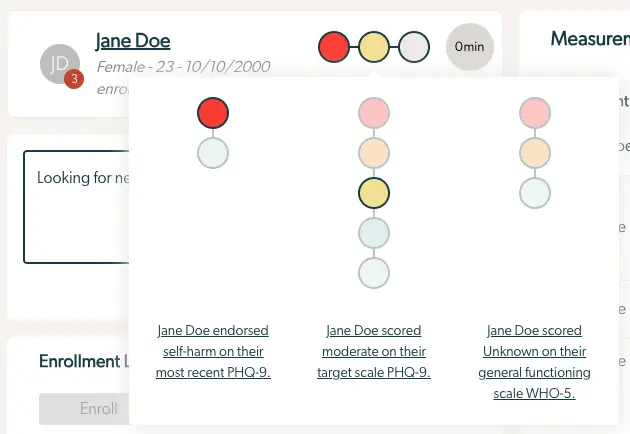
The screenshot displays a section of the Mirah Collaborative Care interface focused on patient status badges. At the top left, the patient's name, Jane Doe, is shown along with demographic details such as gender, age, and enrollment date. Next to the name, there is a circular avatar with the initials 'JD' and a red badge indicating a notification count of 3. To the right of the name, a series of colored circles represent different status indicators, with a tooltip providing detailed explanations. The first circle is red, indicating Jane Doe endorsed self-harm on their most recent PHQ-9 assessment. The second circle is yellow, showing a moderate score on their target scale PHQ-9. The third circle is grey, indicating an unknown score on the general functioning scale WHO-5. Below the status indicators, there is a text box with the message 'Looking for new...' and an 'Enrollment' section with a disabled 'Enroll' button. The purpose of this screen is to provide a quick overview of the patient's mental health status and recent assessment results, aiding in collaborative care and decision-making.

Clicking on the text explaining what a patient scored will take you to the feedback report viewing the details of that score. The color on the report matches the color of the status badge bubble. As an example, clicking on "[patient name] scored moderate on their target scale PHQ-9" links directly to the responses for the most recent PHQ-9 measurement.
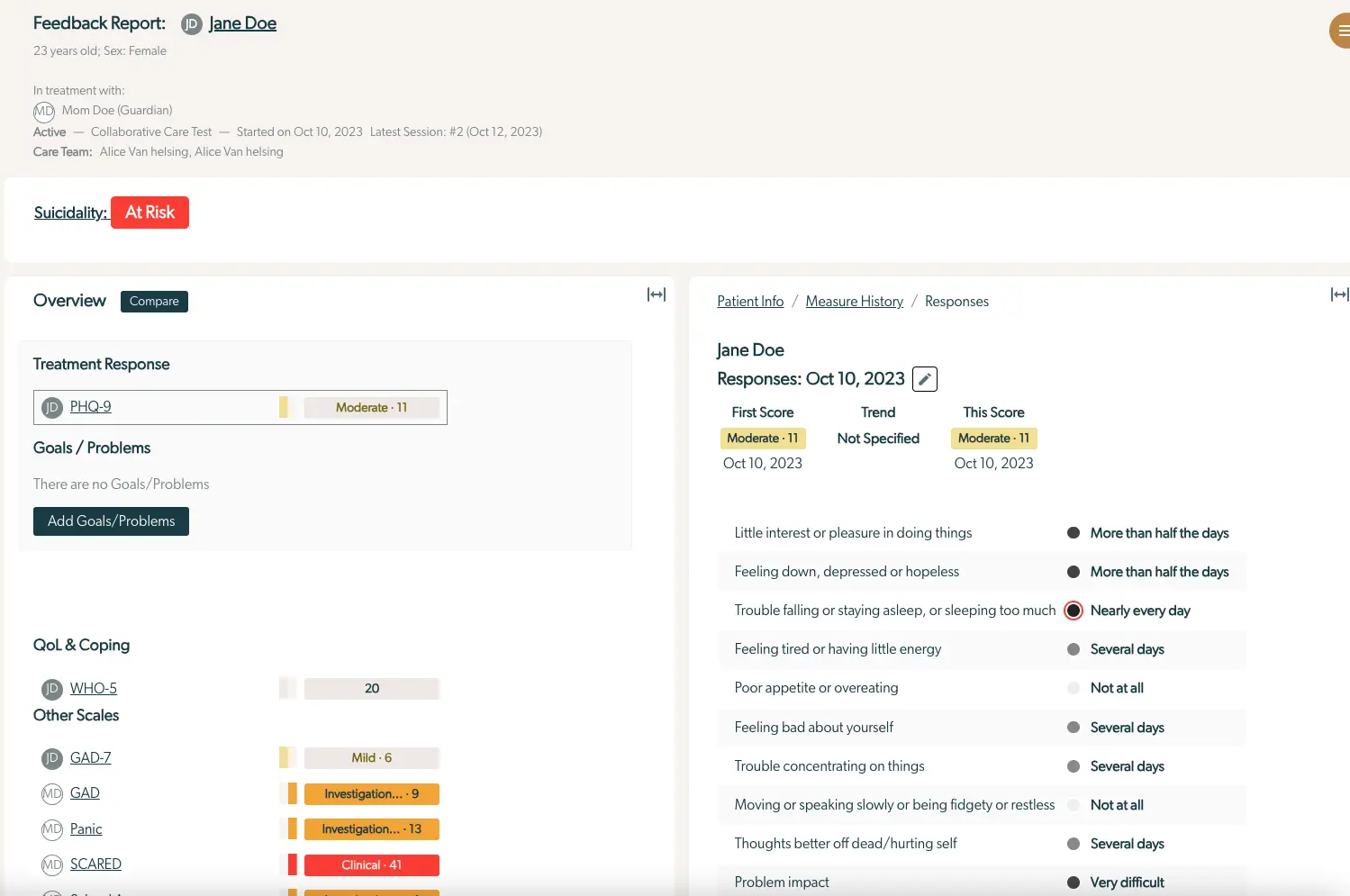
The screenshot displays a feedback report for a patient named Jane Doe, who is 23 years old and female. The report indicates that Jane is in treatment with Mom Doe as her guardian, and she is part of the Collaborative Care Test, which started on October 10, 2023, with the latest session being number 2 on October 12, 2023. The care team includes Alice Van Helsing. A red 'At Risk' badge is prominently displayed next to 'Suicidality,' indicating a critical status. The screen is divided into two main sections: Overview and Responses. The Overview section includes Treatment Response, showing a PHQ-9 score of Moderate - 11, and a Goals/Problems section with a button labeled 'Add Goals/Problems' for adding new entries. The QoL & Coping section lists various scales such as WHO-5, GAD-7, GAD, Panic, and SCARED, with scores ranging from mild to clinical. The Responses section on the right provides detailed information about Jane Doe's responses on October 10, 2023, with scores and trends specified as Moderate - 11. It lists various symptoms and their frequency, such as 'Little interest or pleasure in doing things' and 'Feeling down, depressed or hopeless,' both marked as 'More than half the days.' The screen is designed to provide a comprehensive view of the patient's mental health status and treatment progress.