
How to edit an organization

Organizations in Mirah reflect the structure of your practice, and help you apply different measurement plans to different patients depending on how they're being treated. To see a list of the your organizations in Mirah, use the Organizations link in the institute menu:

The screenshot displays a dropdown menu under the label 'Test Hospital', which is part of the navigation interface in Mirah Measurement-Based Care. The dropdown menu includes several options: Failed Logins, Measure Library, Measurement Plans, Treatment Tracks, and Organizations. The Organizations option is highlighted, indicating it is the selected or intended choice for the user. This menu is used to navigate different sections related to managing and editing organizational settings within the Mirah platform.

On that page you'll see a tree list of your organizations. Select the organization you want to edit from the list, and its details will be shown next to the list. If allowed, you'll see a button labeled "Edit Organization".
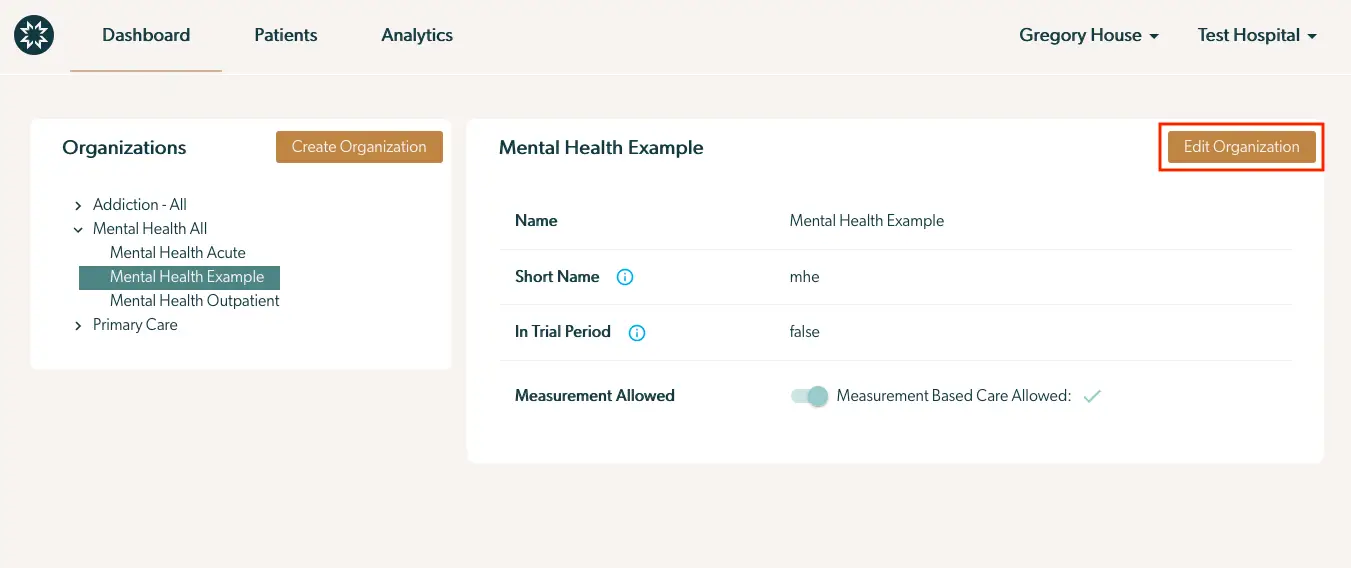
The screenshot displays the interface for managing organizations within the Mirah Measurement-Based Care platform. On the left side, there is a panel titled 'Organizations' listing various organization categories such as 'Addiction - All', 'Mental Health All', and 'Primary Care'. The 'Mental Health All' category is expanded to show subcategories including 'Mental Health Acute', 'Mental Health Example', and 'Mental Health Outpatient'. The 'Mental Health Example' is highlighted, indicating it is currently selected. To the right, details of the selected organization 'Mental Health Example' are shown, including fields for 'Name', 'Short Name', 'In Trial Period', and 'Measurement Allowed'. The 'Measurement Allowed' field indicates whether measurement-based care is permitted, with a toggle switch and a checkmark showing it is allowed. At the top right corner of this section, there is a button labeled 'Edit Organization', which allows users to modify the organization's details.

There are two reasons you might not see the Edit Organization button:

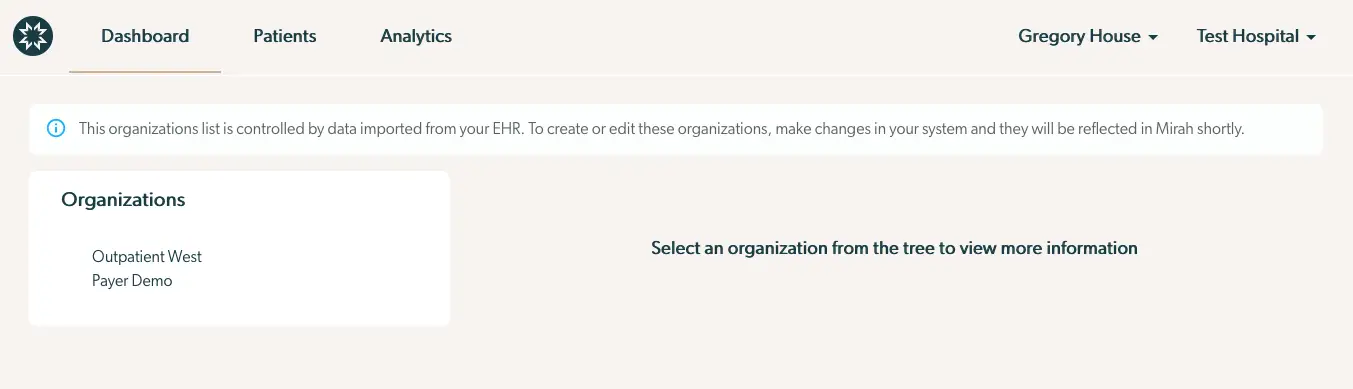
  • Your organizations are being imported from your EHR. In that case, you'll see a banner across the top of the page that looks like this:
    • *In order to make sure the data stays in sync, Mirah doesn't make changes to imported organizations. To create a new organization, create it in your EHR and Mirah will import it. The screenshot displays the Mirah Measurement-Based Care interface for managing organizations. At the top, there is a navigation bar with options for Dashboard, Patients, and Analytics. On the right side, user information is displayed with the name 'Gregory House' and the associated organization 'Test Hospital'. Below the navigation bar, a notification message informs users that the organization list is controlled by data imported from their EHR, and changes should be made in their system to be reflected in Mirah. The main section of the screen is divided into two parts: on the left, there is a list of organizations under the heading 'Organizations', which includes 'Outpatient West' and 'Payer Demo'. On the right, there is a prompt instructing users to select an organization from the list to view more information.
  • You aren't a superuser in Mirah. Only users with the superuser role are allowed to edit organizations.
    • If you can see the Edit Organization button, click it and you'll see a form like this: The 'Edit Organization' screen allows users to modify details of an organization within the Mirah platform. At the top, users can optionally select a parent organization from a hierarchical list, with 'Addiction - All' and 'Mental Health All' as options, and 'Primary Care' as a subcategory. Below, there are fields for 'Name' and 'Short Name' where users can input or edit the organization's name and abbreviation, respectively. Two checkboxes are available: 'In Trial Period' to indicate if the organization is in a trial phase, and 'Measurement Allowed' to permit measurement-based care functionalities. The 'Measurement Allowed' checkbox is checked, indicating that this feature is enabled. At the bottom right corner, there is a 'Save' button to confirm and apply changes made to the organization details.

The form requires the following pieces of data:

  1. The parent organization of your new organization. You can optionally group related organizations together, either to share measurement plans or to reflect the structure of your practice.
  2. The name of your new organization. This is what Mirah will usually display when describing the organization.
  3. The short name of your new organization. Mirah will sometimes show organization short names in places where longer names would be hard to read, like small dropdown menus.
  4. Whether or not the organization is in a trial period. Organizations in a trial period will automatically create care episodes when receiving appointment data from an integration, but will set those care episodes to not be participating in measurement based care. For more information see this article.
  5. Whether or not the organization has measurement allowed for care episodes within it. If the organization does not have measurement allowed selected, Mirah will not automatically send measurements to patients when we import appointments within this organization.

Once you've filled out the form, click Save, and changes to the organization will be reflected on the page:
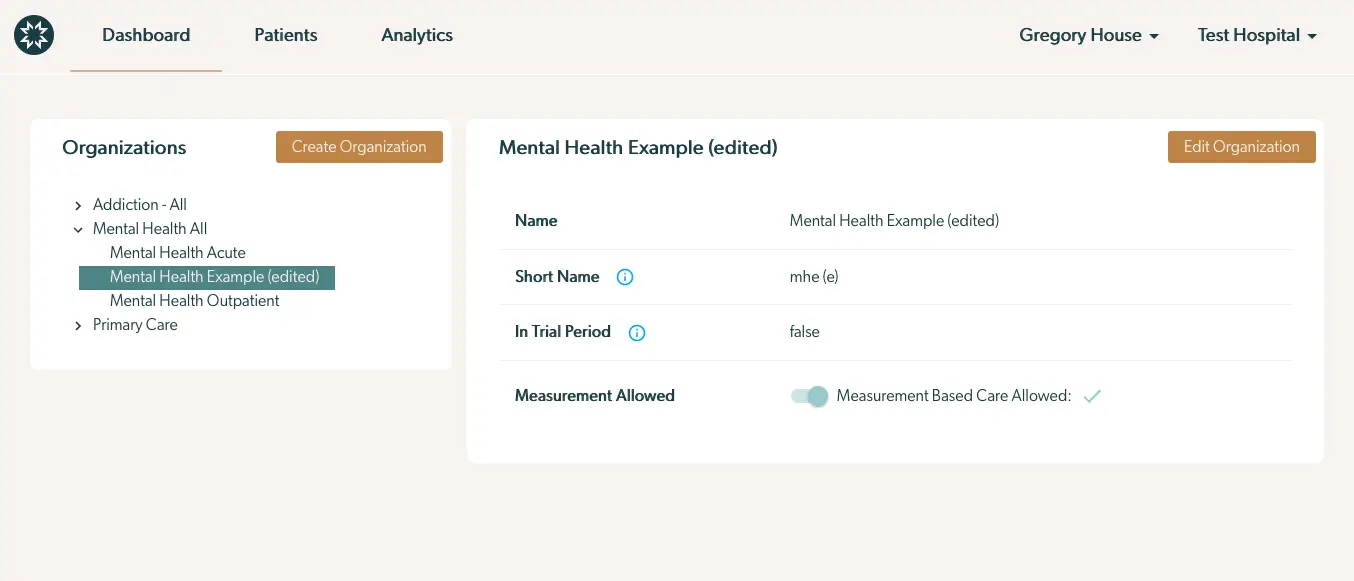
The screenshot displays the interface for editing an organization within the Mirah Measurement-Based Care platform. On the left side, there is a panel titled 'Organizations' listing various organization categories such as 'Addiction - All', 'Mental Health All', and 'Primary Care'. The 'Mental Health Example (edited)' organization is highlighted under 'Mental Health All'. Above this list, there is a 'Create Organization' button. On the right side, details of the selected organization 'Mental Health Example (edited)' are shown, including fields for 'Name', 'Short Name', 'In Trial Period', and 'Measurement Allowed'. The 'Name' field displays 'Mental Health Example (edited)', the 'Short Name' field shows 'mhe (e)', and the 'In Trial Period' field is set to 'false'. The 'Measurement Allowed' field has a toggle switch indicating 'Measurement Based Care Allowed' with a checkmark. An 'Edit Organization' button is located at the top right of the organization details panel. The top navigation bar includes links to 'Dashboard', 'Patients', and 'Analytics', with user and organization identifiers 'Gregory House' and 'Test Hospital' on the right.