Outcomes Framework - Select a Preset Metric
Mirah has created a set of metrics according to best-practices that you can use as a starting point. To get started, in the "Choose a template or start from scratch" section, select "Use the following template" and click into the "Select a template dropdown".
If you want to start from scratch, see here about how to choose a scale.
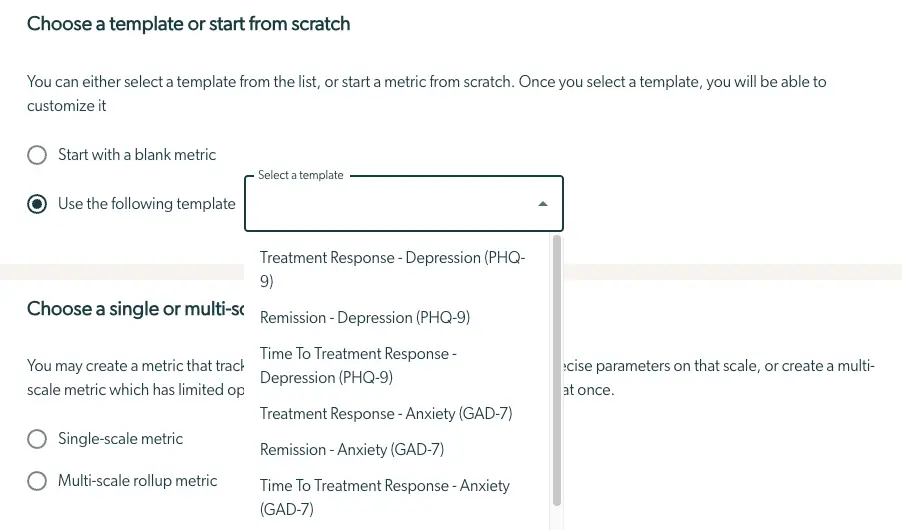
You will see several choices for a template, and select one that fits your needs. You can make other metrics when you are done, so don’t worry if you want to use multiple templates.
Next, scroll down to the "Choose a single or multi-scale metric" section.
There are two modes of metrics:
- "Single-Scale Metrics" measure one scale in detail. You can set precise outcomes such as a specific final range of scores for the measure. For example, success is measured by scoring less than 5 points on the PHQ9.
- "Multi-Scale Metrics" measure many scales at once, so that you can look for improvement across a set of conditions or age ranges. These scales have limited options for measuring success because multiple metrics don’t combine well quantitatively. For example, you cannot measure a precise score on a Multi-Scale Metric.
See more details on Single-scale vs Multi-scale metrics here.
We recommend you start with:
- For a Single-Scale Metric, “Treatment episode Response - Depression (PHQ-9)”. This will measure how many in your patient population have responded to the Treatment Episodes for depression, as measured by the PHQ-9.
- For Multi-Scale Metric, “Treatment episode Response or Remission - Common Scales”. This measures success broadly across a wide variety of scales.
If you want to set up your own metric, here is information on how to do that.
Next up: Setting the date and entity