
Minutes Targets

In Collaborative Care, billing is based on the total number of minutes acquired per patient each month. Our "Minutes Targets" page outlines how patients are categorized based on the total number of minutes accrued within a month. These targets help ensure accurate billing in alignment with CMS guidelines and provide visual benchmarks to support care managers.

Minutes Targets Logic​

CoCM codes are relatively new and are still under continual development. These codes allow institutes to successfully bill for reimbursement for individual CoCM patients. To. qualify for billing, patient minutes must be tracked and logged each month. The Mirah platform automates this process by tracking patient-level minutes and highlighting which patients are approaching the threshold for the next billing tier.

In order to bill each code, a certain amount of minutes must be acquired every month. Mirah defaults to the standards outlined in the table. However, if your institute wishes to customize these targets, please reach out to your CSM.

CPT CodeTime FrameTime Range (Minutes)DescriptionCan this be used with another code in-month?
G2214First or Subsequent Months16-30CoCM: 30 minutes per calendar month; billable at 16 minutesNo, only if criteria is not met for 99492 or 99493
99492First Month36-75CoCM: 70 minutes per calendar month; billable at 36 minutesYes, use with 99494
99493Subsequent MonthsInitial Subsequent Month: 31-65Following Subsequent Months:31-40CoCM: 60 minutes per calendar month; billable at 31 minutes; eligible for billing subsequent to a first month billing codeYes, use with 99494
99494Any month16-30CoCM: Each additional 30 minutes per calendar month; billable at 16 minutes beyond total timeYes, use with 99492 and 99493

The "Minutes Targets" Page​

1.) To access the "Minutes Targets" page, select "Configuration" in the vertical navigation menu and click on "Minutes Targets".
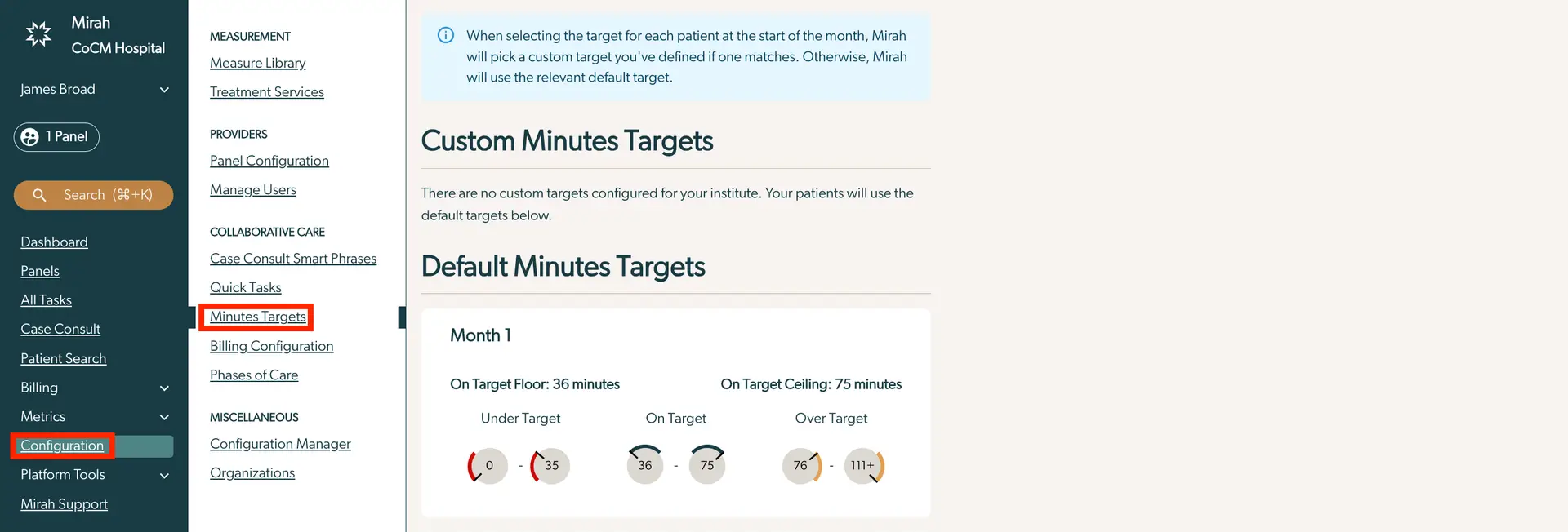
The screenshot displays the 'Minutes Targets' section within the Mirah Collaborative Care platform, specifically under the Configuration menu. The left sidebar shows navigation options including Dashboard, Panels, All Tasks, Case Consult, Patient Search, Billing, Metrics, Configuration, Platform Tools, and Mirah Support. The Configuration section is expanded, highlighting 'Minutes Targets' in red, indicating the current selection. The main content area provides information on Custom Minutes Targets and Default Minutes Targets. A blue information box at the top explains that Mirah will select a custom target for each patient at the start of the month if defined, otherwise, it will use the default target. Below, the Custom Minutes Targets section states that no custom targets are configured, and patients will use default targets. The Default Minutes Targets section outlines targets for Month 1, with an On Target Floor of 36 minutes and an On Target Ceiling of 75 minutes. It categorizes time spent as Under Target (0-35 minutes), On Target (36-75 minutes), and Over Target (76-111+ minutes).

2.) This page exhibits an Institute's Custom Minutes Targets and the Default Minutes Targets. When selecting the target for each patient at the start of the month, Mirah will pick a custom target you've defined if one matches. Otherwise, Mirah will use the relevant default target.
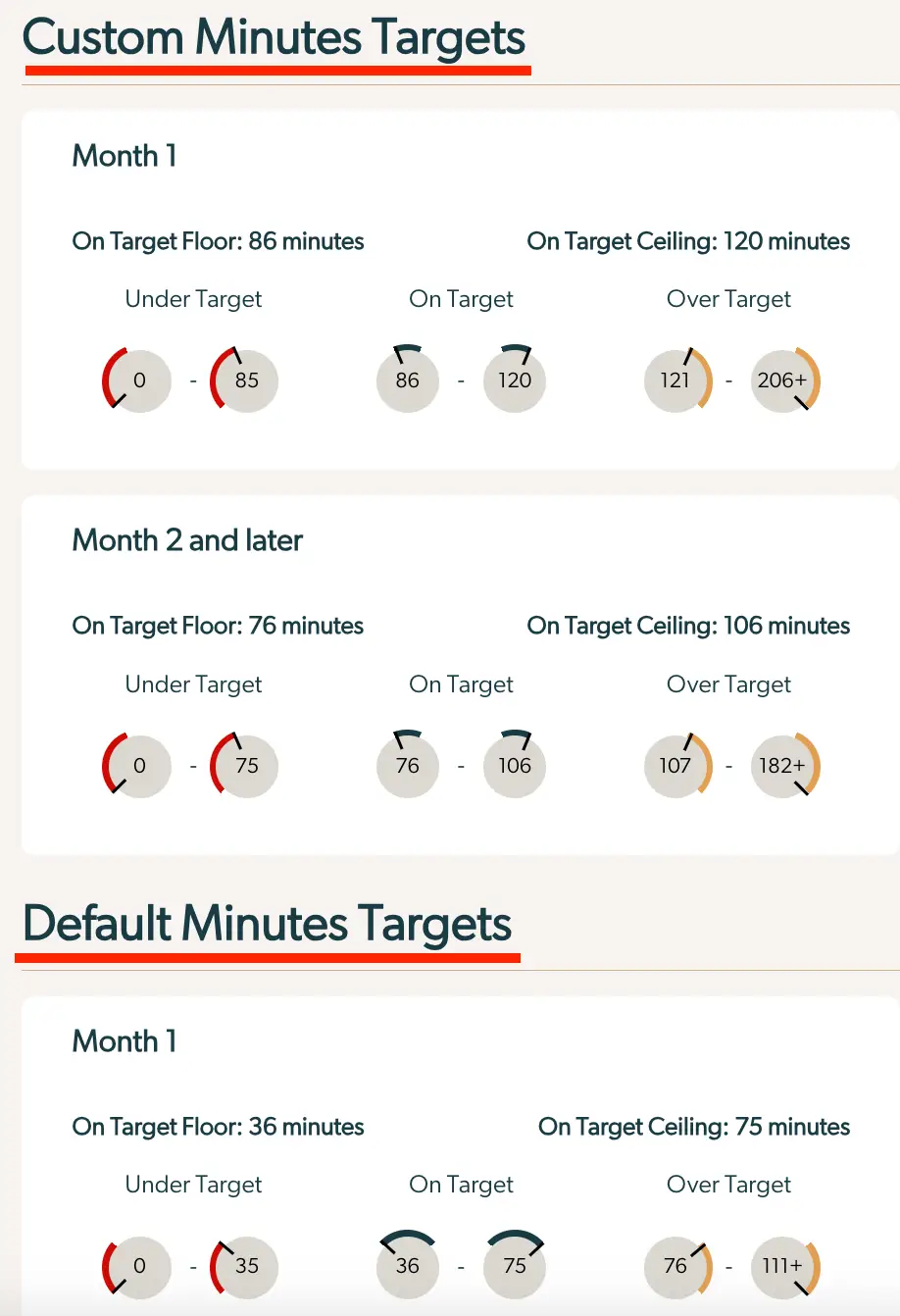
The screenshot displays the 'Minutes Targets' section of the Mirah Collaborative Care platform, focusing on setting custom and default minutes targets for collaborative care sessions. The 'Custom Minutes Targets' section is divided into 'Month 1' and 'Month 2 and later', each with specified 'On Target Floor' and 'On Target Ceiling' minutes. For 'Month 1', the target floor is 86 minutes, and the ceiling is 120 minutes, with ranges for 'Under Target' (0-85 minutes), 'On Target' (86-120 minutes), and 'Over Target' (121-206+ minutes). For 'Month 2 and later', the target floor is 76 minutes, and the ceiling is 106 minutes, with ranges for 'Under Target' (0-75 minutes), 'On Target' (76-106 minutes), and 'Over Target' (107-182+ minutes). The 'Default Minutes Targets' section also includes 'Month 1', with a target floor of 36 minutes and a ceiling of 75 minutes, showing ranges for 'Under Target' (0-35 minutes), 'On Target' (36-75 minutes), and 'Over Target' (76-111+ minutes). Each section is visually separated with colored arcs indicating the target ranges.

3.) To further understand each measure, simply hover over the circle logo with your mouse to get a clearer definition.

The screenshot displays a section of the Mirah Collaborative Care interface focused on tracking minutes accrued for the month. It shows a message indicating that 36 minutes have been accrued, with a target range set between 36 and 75 minutes. Below the message, there is a visual representation of the minutes accrued using circular gauges. Each gauge is marked with a number, representing different ranges: 0, 35, 36, 75, and 76. The gauge corresponding to 36 minutes is highlighted with an arrow pointing to it, indicating the current accrued minutes. This interface helps users monitor their progress towards meeting the monthly target for collaborative care activities.