Monthly Billing Report - Feature Guide

What is the Monthly Billing Report?​

The Monthly Billing Report can be used to review billable patients for a given month, as well as additional information about those patients.

This article examples:

  • How to access and use the Monthly Billing Report
  • Fields on the Billing Report
  • How to download Monthly PDFs

How to access and use the Monthly Billing Report​

1.) On the left hand side of the application, click on “Monthly Billing Report”
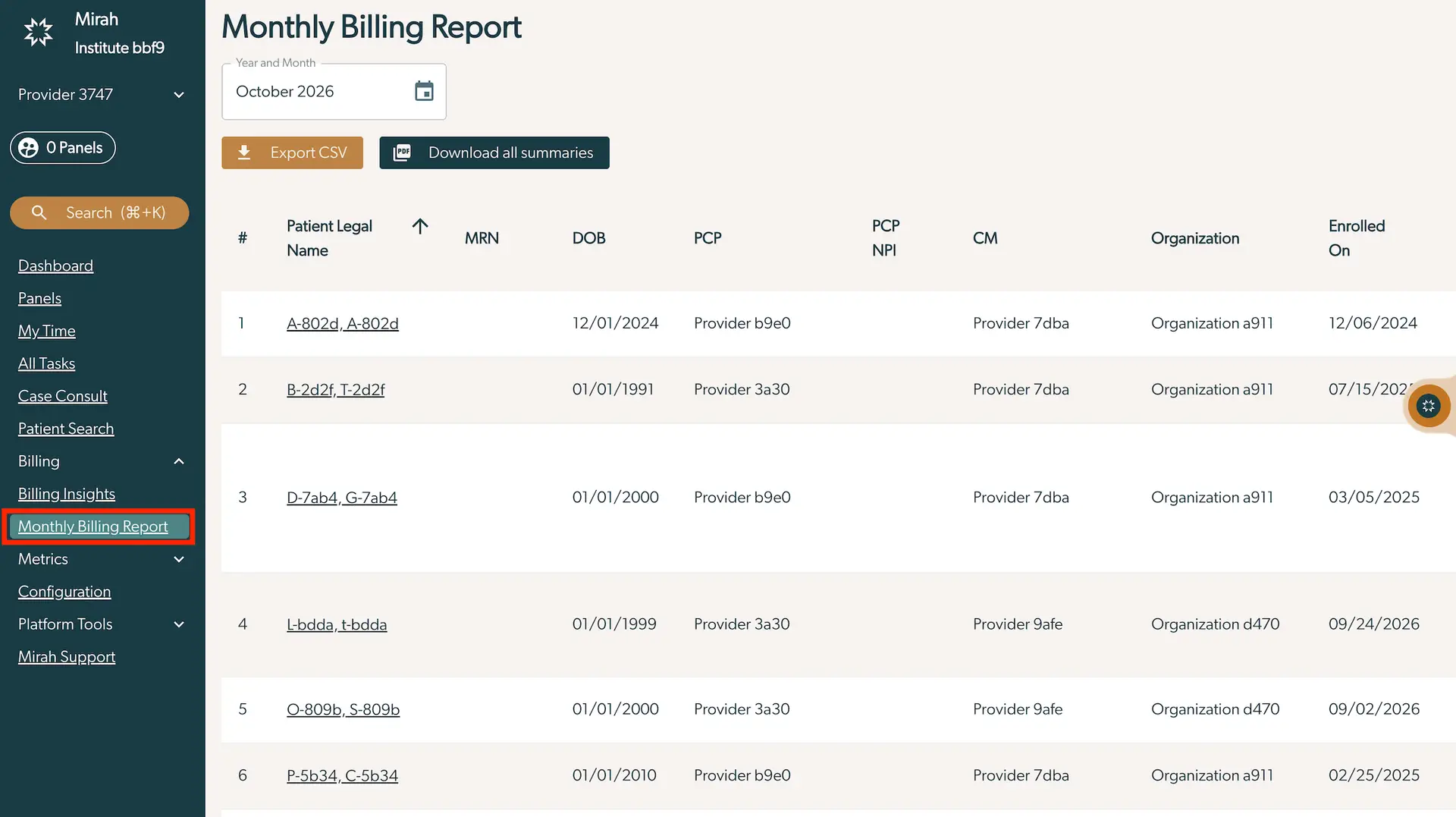
The Monthly Billing Report screen in Mirah Collaborative Care provides a detailed view of billing information for October 2026. At the top, there is a dropdown to select the year and month, currently set to October 2026. Below, there are two buttons: 'Export CSV' on the left and 'Download all summaries' on the right, allowing users to export or download the report data. The main table displays columns for Patient Legal Name, MRN (Medical Record Number), DOB (Date of Birth), PCP (Primary Care Provider), PCP NPI (National Provider Identifier), CM (Care Manager), Organization, and Enrolled On date. Each row represents a patient with corresponding details. The left sidebar includes navigation options such as Dashboard, Panels, My Time, All Tasks, Case Consult, Patient Search, Billing, Billing Insights, Monthly Billing Report (highlighted), Metrics, Configuration, Platform Tools, and Mirah Support.

2.) You will see an option to select the Year and Month to generate the corresponding billing report. *Note - this will default to the current month and year

  • Click on the calendar icon The screenshot displays the Monthly Billing Report page, which is part of the Billing Insights feature in Mirah Collaborative Care. The page is designed to provide users with insights into billing activities for a specific month. At the top, the title 'Monthly Billing Report' is prominently displayed, indicating the purpose of the page. Below the title, there is a section labeled 'Year and Month' where users can view or select the billing period. Currently, the selected month is February 2024. Next to the month selection, there is a calendar icon outlined in red, located on the right side, which users can click to open a date picker for selecting different months and years for the report.
  • Select the Year (which will reload the table) The screenshot displays the Monthly Billing Report interface within the Mirah Collaborative Care platform. At the top, the title 'Monthly Billing Report' is prominently displayed, indicating the purpose of the screen. Below the title, there is a dropdown menu labeled 'Year and Month' with the current selection showing 'February 2023'. To the right of this dropdown is a calendar icon, which users can click to open the date selection menu. The dropdown menu is expanded, revealing a grid of years ranging from 2012 to 2024, allowing users to select a specific year for their billing report. The year 2023 is highlighted, indicating it is the currently selected year. This interface allows users to navigate and select different months and years to view corresponding billing reports.
  • Select the Month (which will reload the table) The screenshot displays a date selection interface for choosing the year and month within the Mirah Collaborative Care platform, specifically for generating a monthly billing report. At the top, there is a dropdown field labeled 'Year and Month' with the currently selected date 'February 2023'. Next to this field is a calendar icon, indicating the ability to select a date. Below, a dropdown menu is expanded, showing all months of the year in a grid format, with 'Feb' highlighted to indicate the current selection. Users can click on any month to change the selection, which will update the billing report accordingly.
  • Alternative click on the triangle by the Month Date to toggle between selecting a year or the month The screenshot displays a dropdown menu for selecting a date within the Monthly Billing Report feature of Mirah Collaborative Care. The menu is currently set to August 2023, with a small upward-facing triangle next to the date indicating the dropdown can be collapsed. Below the current month and year, a grid of years ranging from 2012 to 2024 is presented, allowing users to select a different year for viewing billing insights. The year 2023 is highlighted with a dark background, indicating it is the currently selected year. This interface element is part of the billing insights feature, which aids in collaborative care by providing detailed reports and analytics for selected time periods.

3.) You can export this report as a .csv document by clicking on “Export”. *Note - this report contains PHI - please follow necessary steps to secure any PHI downloaded from Mirah
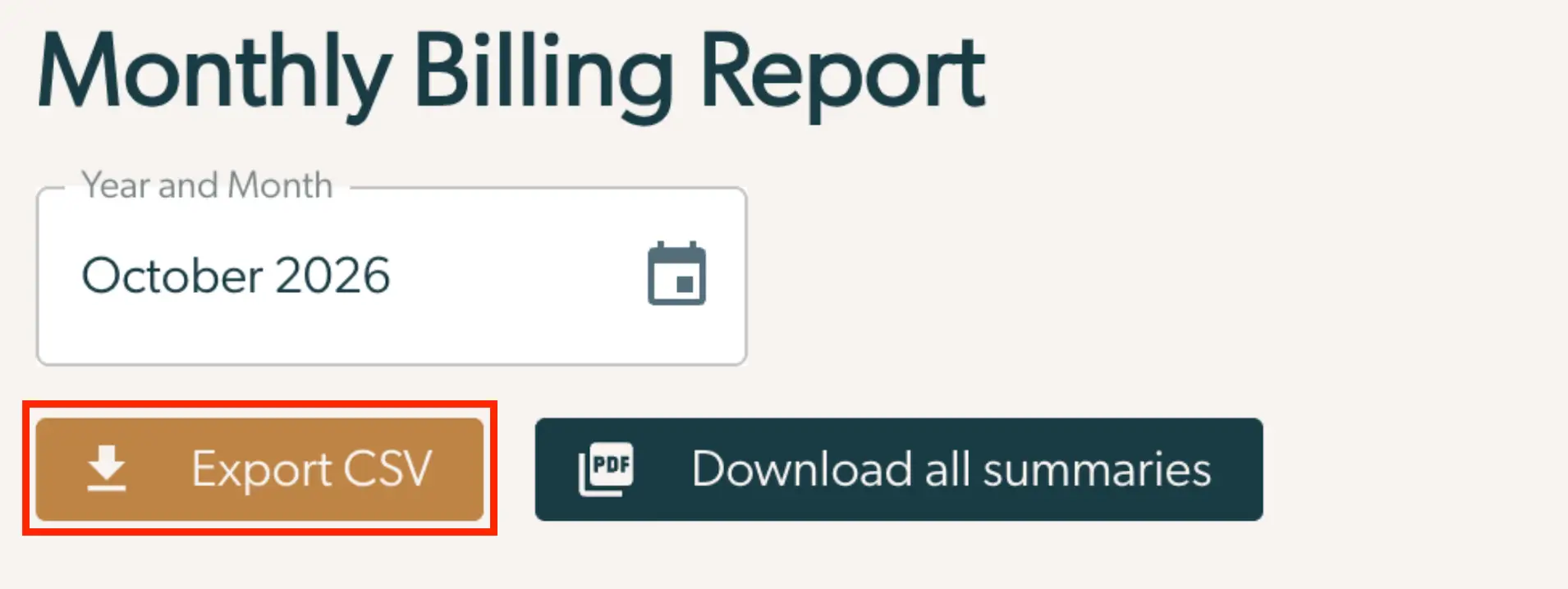
The screenshot displays the Monthly Billing Report interface for Mirah Collaborative Care. At the top, the title 'Monthly Billing Report' is prominently displayed. Below it, there is a date selection field labeled 'Year and Month' with the date 'October 2026' entered. To the right of this field is a calendar icon for selecting the date. Below the date field, there are two buttons. The first button on the left is labeled 'Export CSV' in white text on a brown background, used for exporting the report data in CSV format. The second button on the right is labeled 'Download all summaries' in white text on a dark green background, used for downloading all report summaries in PDF format.

Fields on the Billing Report​

Patient Legal NameFirst & Last name of the patient
MRNMedical Record Number Mirah has for this patient (either configured in an EHR integration, or manually entered in patient creation)
DOBDate of birth
Billable MinutesTotal number of minutes tracked for this patient after the enrollment date
PCPPrimary Care Provider assigned to this patient on enrollment
PCP NPIPrimary Care Provider's NPI (either configured in an EHR integration or manual user creation)
CMCare Manager assigned to this patient
OrganizationThe organization the patient’s active enrollment is in
Enrolled OnEnrollment Date for active episode of care
Assessment CompletedTrue if a patient has completed a validated measurement for this calendar month
MonthCurrent count of calendar months a patient has been in the program. Example: If a patient enrolls on the 31st, that month counts as month 1, and the next day as month 2.
Billing MonthWhich billing month this row applies to
Billable MinutesNumber of minutes billable in the current month
CodesMarks whether billable minutes meet the threshold for code eligibility
99492Records number of 99492 codes that can be billed in the selected month
99494Records the number of 99492 codes that can be billed in the selected month

How to download Monthly PDFs​

On the Billing Summary you can also download a PDF containing everything which happened for a patient in a particular month.

This report can be copied into the EHR to provide full documentation for a Collaborative Care encounter, as well as providing audit evidence for the time spent providing Collaborative Care which can be used to bill services.

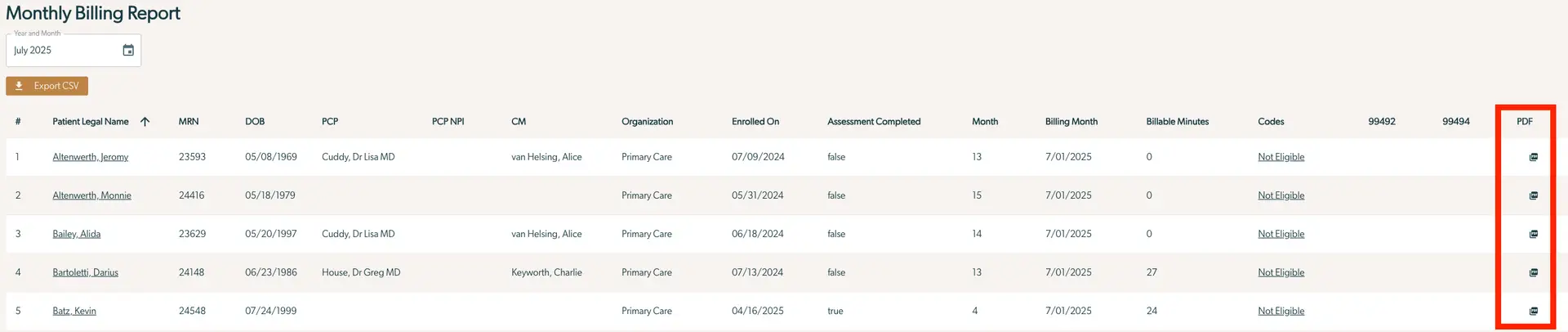
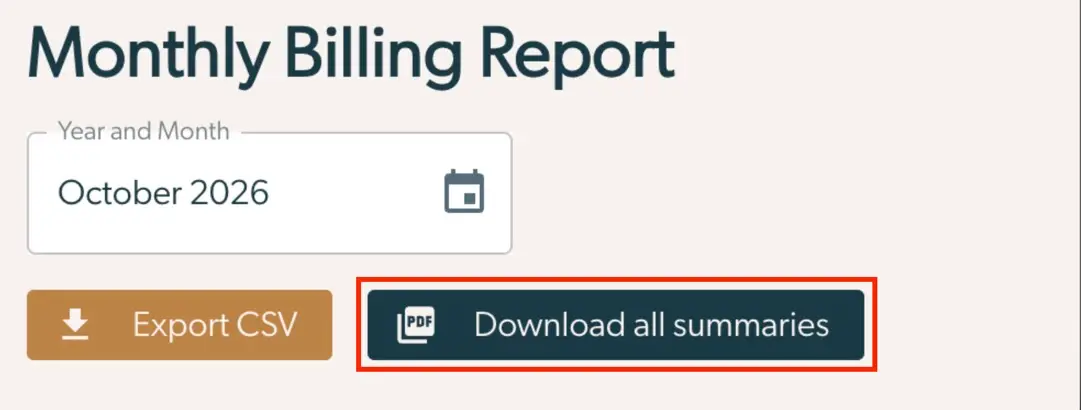
You have the option to download a PDF individually for a patient by clicking the PDF icon OR you can download the PDF summaries for multiple patients at a time using the "Download all summaries" button. This will download a zip file containing summaries for all patients in the list. This means the export contains all rows in the currently visible list, not all rows for your organization. The list on this page is filtered by any currently selected panel filters and user limits for patient access.

Individually​

The Monthly Billing Report screen for Mirah Collaborative Care displays a detailed table of patient billing information for July 2025. At the top, there is a dropdown menu labeled 'Year and Month' with the selected value 'July 2025' and a calendar icon for date selection. Below this, a button labeled 'Export CSV' is located on the left side, allowing users to export the report data. The table includes columns for patient details and billing information: '#', 'Patient Legal Name', 'MRN' (Medical Record Number), 'DOB' (Date of Birth), 'PCP' (Primary Care Provider), 'PCP NPI' (National Provider Identifier), 'CM' (Care Manager), 'Organization', 'Enrolled On', 'Assessment Completed', 'Month', 'Billing Month', 'Billable Minutes', 'Codes', '99492', '99494', and 'PDF'. Each row represents a patient, with their respective data filled in. The 'PDF' column on the far right contains icons for downloading individual patient reports in PDF format.

Bulk Download​

The screenshot displays the Monthly Billing Report interface of the Mirah Collaborative Care platform, focusing on the Billing Insights feature. At the top, the title 'Monthly Billing Report' is prominently displayed. Below it, there is a date selection field labeled 'Year and Month' with the date 'October 2026' entered, accompanied by a calendar icon for selecting different dates. To the left, there is a brown button labeled 'Export CSV' for exporting the report data in CSV format. To the right, there is a dark blue button labeled 'Download all summaries' with a PDF icon, allowing users to download the report summaries in PDF format.