
How to edit the clinician for a recurring appointment series

On the Detail Page of the patient Click "Edit" for the next recurring session scheduled:
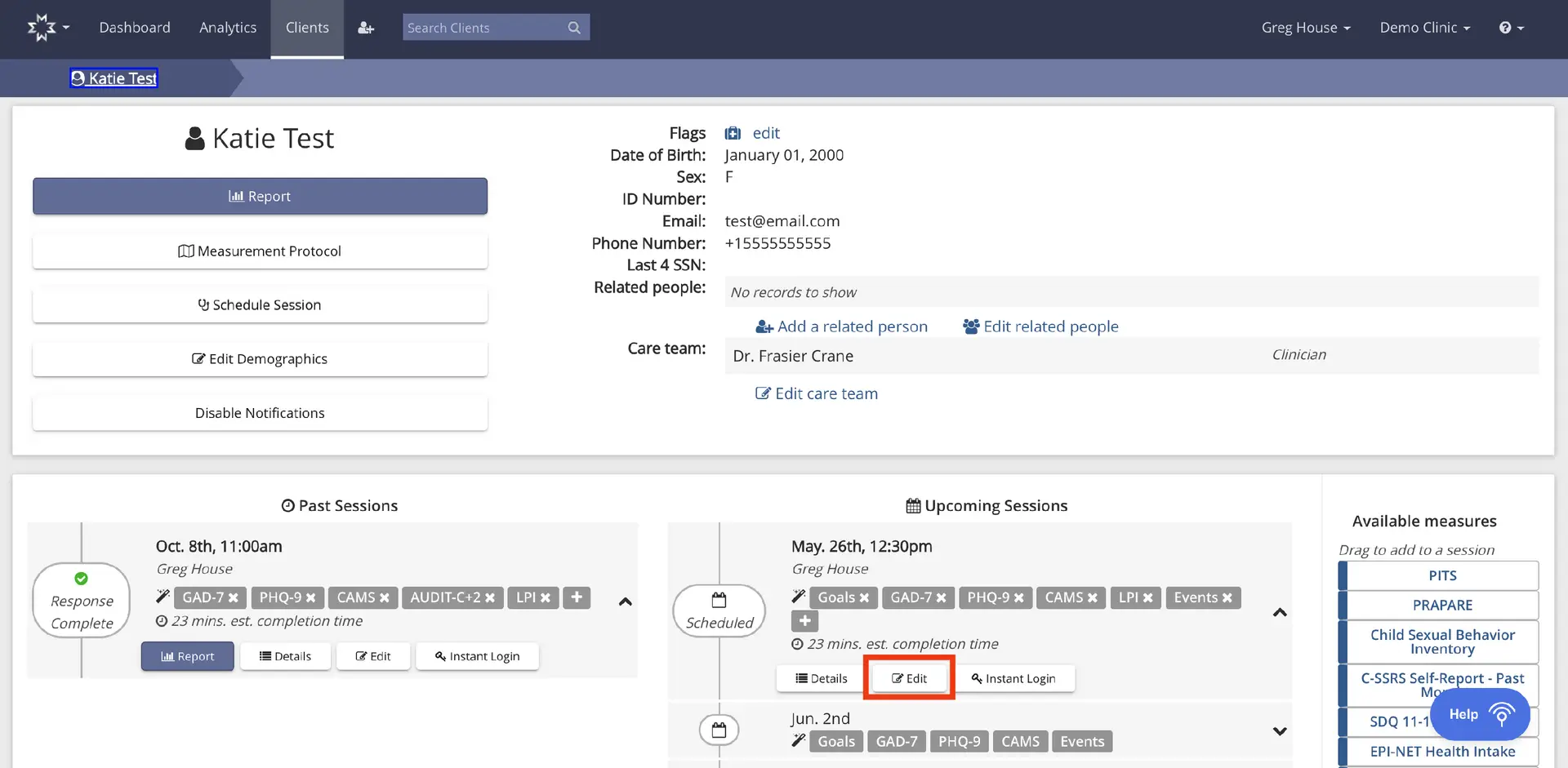
The screenshot displays the client profile page for 'Katie Test' within the Mirah Measurement-Based Care platform. At the top, the navigation bar includes options for Dashboard, Analytics, and Clients, with a search bar to find clients. The breadcrumb trail shows the path 'Clients > Katie Test'. The main section is divided into two columns. The left column features a large 'Report' button, followed by buttons for 'Measurement Protocol', 'Schedule Session', 'Edit Demographics', and 'Disable Notifications'. The right column provides client details such as Flags, Date of Birth, Sex, ID Number, Email, Phone Number, Last 4 SSN, and Related people, with options to 'Add a related person' and 'Edit related people'. The Care team section lists Dr. Frasier Crane as the clinician with an 'Edit care team' link. Below, the 'Past Sessions' section lists a session on Oct. 8th, 11:00 am with Greg House, showing completed assessments and options for 'Report', 'Details', 'Edit', and 'Instant Login'. The 'Upcoming Sessions' section lists a scheduled session on May 26th, 12:30 pm with Greg House, including goals and assessments, with 'Details', 'Edit', and 'Instant Login' options. The 'Edit' button is highlighted in orange. The right sidebar lists 'Available measures' that can be dragged into a session, including PITS, PRAPARE, and others.

Click "[change]" listed next to the primary clinician name you are updating:

The screenshot displays the interface for editing a clinician for a recurring appointment series in the Mirah Measurement-Based Care platform. At the top, there is a navigation bar with options for Dashboard, Analytics, and Clients, along with a search bar labeled 'Search Clients'. The breadcrumb trail indicates the user is in the 'Katie Test' client section, specifically under 'Sessions', 'May 26th', and 'Edit'. The main section is divided into three panels: 'TIME & PROVIDER', 'CONTENT', and 'SUMMARY'. In the 'TIME & PROVIDER' panel, options are available to select between 'Scheduled' and 'Walk-in' appointments. The date is set to 'Thursday, May 26' at '12:30 pm', with a recurrence set to 'Weekly' until 'Aug. 26, 2022'. The current provider is 'Greg House', with a '[change]' link next to it for editing, located at the bottom of this panel. The 'CONTENT' panel explains that the measures for the session are defined by the measurement protocol, with options to confirm the session or disable the protocol. It lists 'Mental Health - Acute' with associated tags like 'CAMS', 'AUDIT-C+2', 'GAD-7', 'PHQ-9', 'Life Problems Inventory', 'Events', and 'Goals'. The 'SUMMARY' panel states that scales and participants will be automatically calculated, listing 'Katie Test (Client)' as a participant. A 'Help' button is located at the bottom right corner of the screen.

Find the clinician's name from the drop down window that appears:
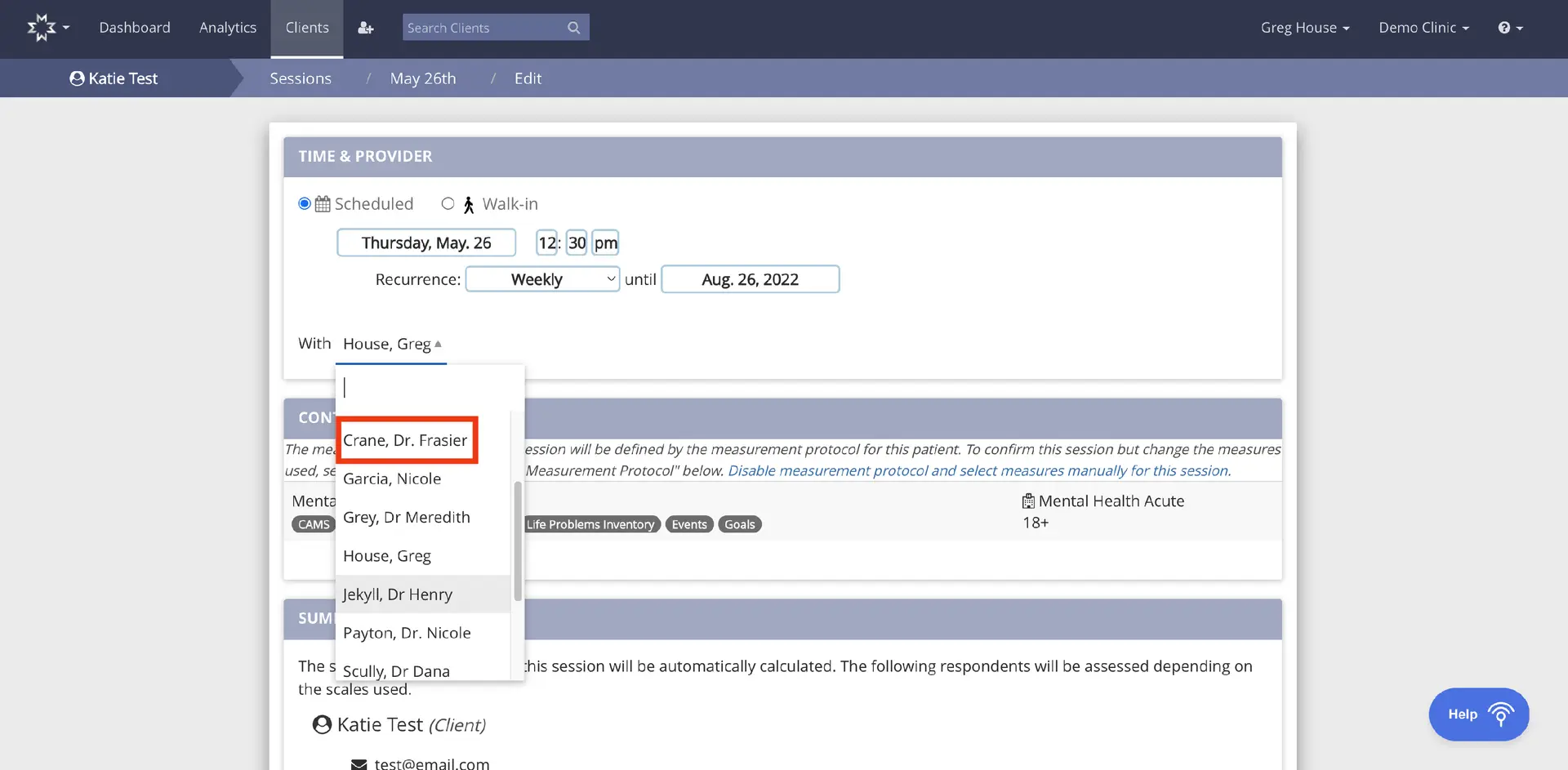
The screenshot displays the interface for editing a recurring appointment series in Mirah Measurement-Based Care. At the top, there is a navigation bar with options for Dashboard, Analytics, and Clients, along with a search bar to find clients. The breadcrumb trail indicates the user is in the 'Katie Test' client section, specifically under 'Sessions' for 'May 26th', in the 'Edit' mode. The main section is titled 'Time & Provider', where users can select between 'Scheduled' and 'Walk-in' appointment types. The date is set to Thursday, May 26, with a time of 12:30 PM. Recurrence is set to 'Weekly' until August 26, 2022. Below, there is a dropdown menu for selecting the provider, currently showing 'House, Greg', with an expanded list highlighting 'Crane, Dr. Frasier'. The 'Context' section provides information about the measurement protocol and options to disable or manually select measures. The 'Summary' section lists the client 'Katie Test' with contact information. A 'Help' button is located at the bottom right corner.

Scroll to the bottom of the screen and click "Confirm Session"
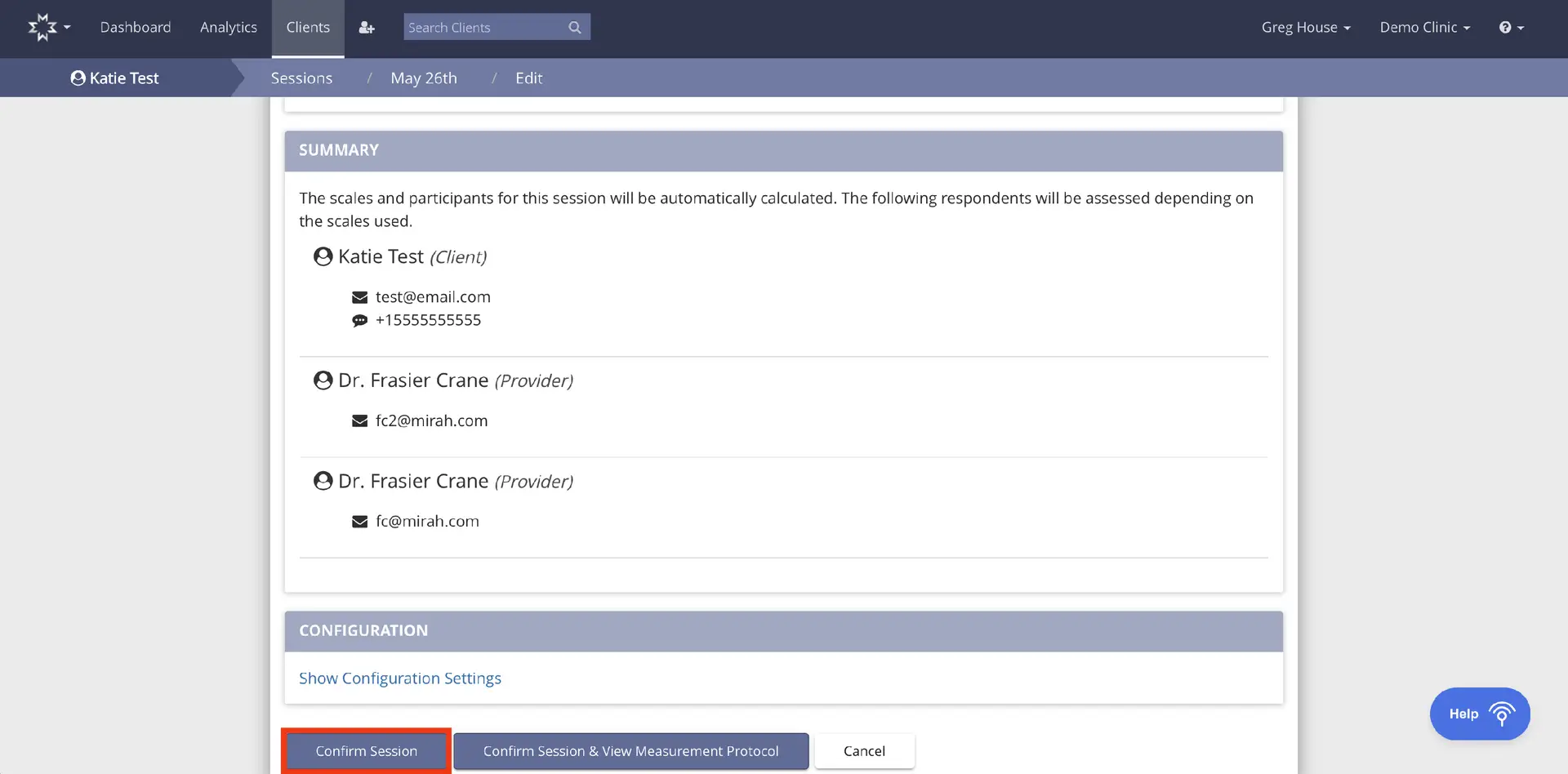
The screenshot displays the session summary and configuration settings for a recurring appointment series in the Mirah Measurement-Based Care platform. At the top, the navigation path shows 'Clients > Sessions > May 26th > Edit', indicating the user is editing a session for a client named Katie Test. The summary section lists the participants involved in the session, including Katie Test as the client with her email and phone number, and Dr. Frasier Crane as the provider with two email addresses. Below the summary, the configuration section offers a link to 'Show Configuration Settings'. At the bottom, there are three buttons: 'Confirm Session' on the left, 'Confirm Session & View Measurement Protocol' in the center, and 'Cancel' on the right. The 'Help' button is located in the bottom right corner of the screen.

A window appears to confirm if you want the change to impact the single session or the entire series. Click "Update Series" and now all upcoming recurring appointments will be updated with the primary clinician associated with that patient.
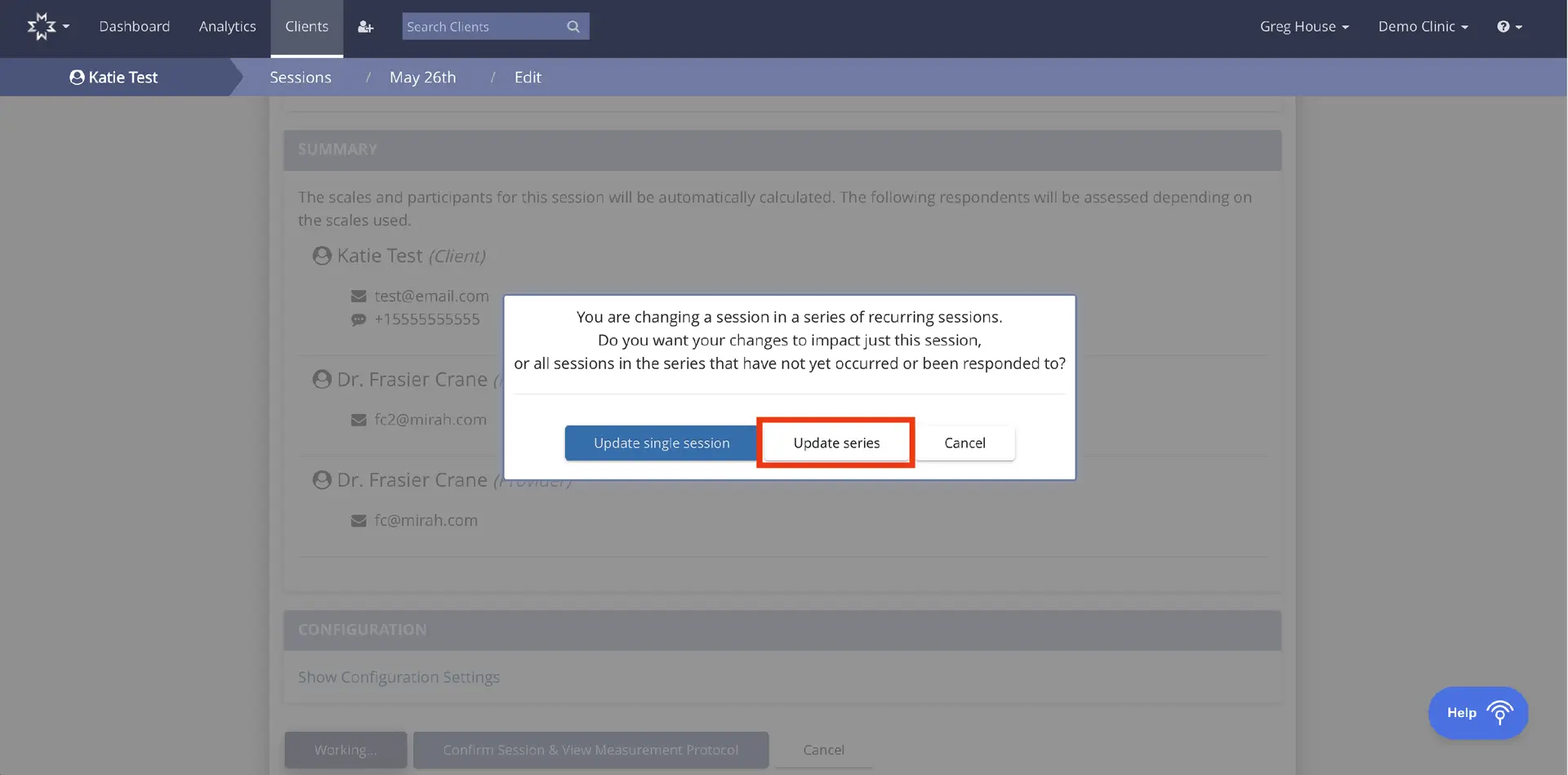
The screenshot displays a dialog box within the Mirah Measurement-Based Care platform, specifically in the context of editing a clinician for a recurring appointment series. The dialog box prompts the user with the message: 'You are changing a session in a series of recurring sessions. Do you want your changes to impact just this session, or all sessions in the series that have not yet occurred or been responded to?' Below the message, there are three buttons: 'Update single session' on the left, 'Update series' in the center, and 'Cancel' on the right. The background shows a summary section listing participants such as Katie Test (Client) and Dr. Frasier Crane (Provider) with their contact information. The top navigation bar includes options like Dashboard, Analytics, and Clients, with a search bar for searching clients. The breadcrumb trail indicates the user is in the Clients section, under Sessions for May 26th, in edit mode. The user is logged in as Greg House at Demo Clinic.